◆SKMEI 1274 Watch Instruction

(SKMEI 1274 dual movements watch dial)
A. Features
- 17 Digits LCD Display,Display Hour ,Minute ,Second , Year(2000~2049)、Day , Month and Week.
- 5 Groups Daily Alarm and Chime hourly
- Countdown function
- Snooze function
- 12 / 24H format,Auto Calendar
- 1/100 second Chronograph
- Dual time function
- EL Backlight
B. Operational Manual

1.At normal time mode,press B key to select the other function display mode, at any state ,press A key EL backlight for 3s.
2.Time setting
- In normal time mode,Press and hold C key for 2s to time setting and "Second" flashing,press A key “Second “to zero;;press B key to select item as following sequence :
Minute → Hour → Day → Month → Year
Press A key to adjust the flashing item,press C to the normal time mode. - Setting “second”,if the “second “is range from 30~59.after turn to 00 ,the “minute” needs“+1”if the second value is range from 00~29”,the “Minute “needn’t change .
- Adjusting the 12/24H format
At normal model,press D key to change the 12H format and 24H format by order.
3.Daily Alarm
- Watch includes 5 groups of daily alarm separately ,”Hour “and “Minute” can be adjusted,When time reach the setting time,it will sound 10s ;”Chime hourly turn on. It will sound “Di Di” each hour.
- Each group alarm display separately as(AL1、AL2、AL3、AL4、AL5),At each group,press D key turn on/off the alarm and the alarm symbol appear/disappear.
- Only AL1 has the snooze function within 5 group alarm ,At AL1 alarm model,press D key turn on/off the snooze function and AL1 alarm symbol;when the snooze function turn on, After AL1 sound stop,it will automatic sound 10s every 5 minute,press C key to turn off the snooze function.
- Alarm time setting:
- a).At Alarm display mode, press A key to selecting and setting AL1 to AL5 .
- b).Choose the Alarm you want,then hold and press C key 2 second :hour” flashing。
- c). Press B key to choice “hour “.”Minute”by order
- d).press A increase the value,press and hold A key can increase the value quickly , press C key exit the Alarm Setting mode and back to Alarm display mode.
- The setting of Five groups alarm clock is the same.
- Stop the alarm clock
When the alarm sounds, press any keys to stop the alarm - The switch of snooze function and Hourly chime function
Display screen In alarm mode 1, press D key to set the selected snooze function on and off.
In the "AL: 00" screen, press the D key to turn on or off the hourly chime. :Indicates that snooze function is on (ON)
 :Indicates that hourly chime is on (ON)
c).If the alarm function is on, the alarm opening symbol will still appear in other display mode.
4.Chronograph Function
- The measure range of chronograph is (0~23”59”59”59)
- If don’t stop Chronograph ,it will be measured continuously,and after reaching the max value ,the chronograph will return back to 0 ,then measure again,
- If exit chronograph model during intermediate time ,the chronograph measure will be back to passing time
- using chronograph measurement:
Passing time :

Intermediate time:

the measure the using time for two players:
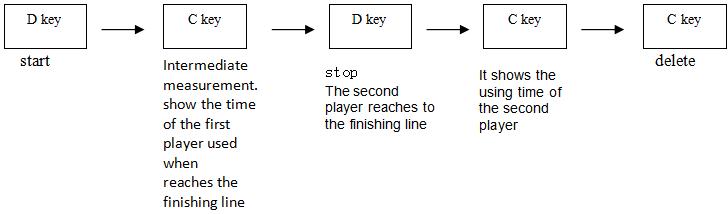
Press C key will show all the time of chronograph measure ,and press C key again chronograph will return to zero
5.Countdown Function
- Countdown can be set in 1 minute and 24 hours, when the countdown to zero, the alarm will sound 10 seconds, then press any key to stop the alarm.
- countdown setting:
a)In the countdown mode, press and hold C key for 2 seconds, enter the countdown setting mode, the flashing.
b). Press B to select the following items:
c).Press A to increase the value, and while press and hold A key can increase the value quickly.
d).After the countdown setting, press C to exit the setting mode and return to the countdown display mode.
e).If want to set the countdown value to 24 hours, Just set it to 0:00. - countdown operation:
Press D to start or pause the countdown, and when the countdown is paused, press C to return to the set starting time.
6.Dual Time
In dual time model.Press and hold C key 2s,the “Hour “will be flashing ,Press B key to select " “Hour”Minute " setting,press A key to adjust the flashing item.what’s more,press and hold A key can increase the value quickly.,then Press C key return to dual time mode.