◆SKMEI 1356 Watch Instruction
A. Basic Features
Basic Features:
- CPU working voltage 3.0V
- Time function:hour, minute, second, year, month, day, 12H/24H,date display setting
- World time function
- Pedometer function
- 2 alarm remind function、hourly remind function
- Stopwatch function,100 groups Lap function
- Countdown function
- Metronome function
- Battery power remind function
- Compass function
Parameter Range:
- Calendar range:2000-2099
- Stopwatch function:0~99 hours 59 minutes 59 seconds 99
- Countdown function:99 hours 59 minutes 59 seconds~0
- Weight:20~200 kg or 44~441 lbs(defaults 75 kg or 165 lbs)
- Walking distance:30~180 cm or 2~71 inch(defaults 70 cm or 28 inch)
- Pedometer:0~999999 Step
- Calories:0.0~99999.9 Kcal
- Distance display:0.00~9999.99 KM or 0.00~9999.99 Mile
- Sport time:0~24H
B. Key and LCD format
Button Instruction:

LCD Distribution:

C. Operation Description
Initialization:
- Time: AM:12:00 00、Jan 1,2016 FR、24H。LCD brightness:5 Sound:on
- World time:12:00 00
- Pedometer:0,pedometer function off
- Alarm clock:AM 12:00、remind function off,hourly function off
- Stopwatch:0,stop
- Countdown:1:00:00,stop
- Metronome:0,30HZ
- Compass:OFFOAL
1、Time Mode

Button Instruction:
- 【K1】key:press K1 to switch to week、Local city name display
- 【K2】key:invalid
- 【K3】key:press switch to world time mode
press 2seconds to enter time setting mode - 【K4】key:turn on backlight
- 【K5】key:enter into compass mode
Remark:
- Press K3 for 2 seconds to enter setting situation,HOLD flash at 2HZ when Press K3 for 0.5 seconds
- In normal mode,SECOND flash at 1HZ
Time Setting Mode:

Button Instruction:
- 【K1】key:setting item plus 1 value
press for 2 seconds to increase the values by 8HZ - 【K2】key:setting item minus 1 value
press for 2 seconds to decrease the values by 8HZ - 【K3】key:press to switch setting item
press and hold for 2 seconds to exit the setting mode - 【K4】key:turn on the backlight for 3 seconds
- 【K5】key:invalid
Remark:
- The cyclic switching setting sequence:local city->DST summer->second->minute->hour->year->month->day->month-day/day-month->12H/24H->LCD brightness->sound turn on/off->city setting
- setting item and SET flash at 2HZ
- without button operation in one minute ,automatically exit setting status
2.World Time Mode:

Button instruction:
- 【K1】key:press to switch cities from East
press for 2 seconds to switch cities from East quickly - 【K2】key:press invalid
press for 2 seconds to turn on/off DST - 【K3】key:switch to pedometer mode
- 【K4】key:turn on backlight
- 【K5】key:invalid
Remark:
- switch to world time mode,display "WT" 1 seconds firstly and then display the current city code
- when UTC was selected as a World Time City,cannot turn on/off summer time
- the standard time/summer time setting only affects the currently selected time zone,other time zones do not affected
3.Pedometer Mode

Button Instruction:
- 【K1】key:cyclic switch:steps->Calories->distance->sport time->steps
- 【K2】key:press is invalid
press 2 seconds to turn/off pedometer - 【K3】key:press key to switch to historical record query mode
press 2 seconds to enter into setting mode - 【K4】key:light up backlight
press for 3 seconds to clear daily steps data - 【K5】key:invalid
Remark:
- steps icon display in pedometer Mode
- 【K1】key :cyclic switch:steps->calories->distance->sport time->steps

- press K2 for 2 seconds in pedometer mode to turn on/off pedometer function
Setting Mode:

Button Operation:
- 【K1】key:press setting item plus 1 value
press for 2 seconds to increase values by 8HZ - 【K2】key:press setting item minus 1 value
press for 2 seconds to decrease values by 8HZ - 【K3】key:press to switch setting item circularly:
unit->step->weight->unit
press for 2 seconds to exit setting mode - 【K4】key:light up backlight for 3 seconds
- 【K5】key:invalid
Remark:
- setting item and SET flash at 2HZ
- automatically exit setting mode without button operation in one minute
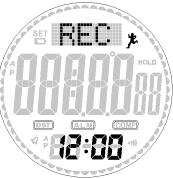
4、Historical Record Query Mode
Button Operation:
- 【K1】switch daily data circularly with data,invalid in no data
- 【K2】switch 7 days data circularly with data,invalid in no data
- 【K3】switch to alarm remind mode
- 【K4】backlight for 3 seconds
- 【K5】invalid
Remark:
- historical record display press【K2】Key to switch to query 7 days data

- Press【K2】key to switch the historical record screen of a certain day

5、Alarm mode
Normal Status:

Key operation:
- Button【K1】:Cyclic switching AL1->AL2->Chime->AL1.
- Button【K2】:Turn On / Off alarm clock switch(Hourly Alarm).
- Button【K3】:Press shortly to switch to the Chronograph mode,
Long press for 2s to enter the setting mode. - Button【K4】:Turn on the EL backlight.
- Button【K5】:Invalid.
Note:
- When reach the setting alarm, it will ring for 30s at 3HZ.
- Without any key operation for 5 minutes,it will automatically return to the normal time mode.
setting status:

Key operation:
- Button【K1】:Press shortly to increase setting data orderly, long press for 2s increase rapidly by 8HZ.
- Button【K2】:Press shortly to decrease setting data orderly,long press for 2s decrease rapidly by 8HZ.
- Button【K3】:Press shortly to switch the setting mode:Hour-> Minute->Hour, Long press for 2s to exit the set status.
- Button【K4】:Turn on the EL backlight.
- Button【K5】:Invalid.
Note:
- Enter the alarm setting mode ,the alarm will be on automatically,the setting item and setting point will flash by 2HZ.
- Without any key operation for one-minute,it will automatically exits the setting status.
6、Chronograph Mode
Normal Status:

Key operation:
- Button【K1】:Start/stop the chronograph mode.
- Button【K2】:When stopped, it’s invalid to shortly press Button【K2】;When running,take a set of Lap ,long press for 2s to reset the chronograph value.
- Button【K3】:Switch to the countdown mode, On LAP status,press Button【K3】for 2s to enter the LAP query status.
- Button【K4】:The EL backlight will flash for 3s.
- Button【K5】:Invalid.
Note:
- The close item flashes when the Chronograph is stopped.
- Without key operation for 5 minutes ,it will return to the normal time mode when the Chronograph is stopped.
- When take a set of Lap , the Lap values display , after 15s it will show LAP+1 and flash.
Lap operation status:

Key operation:
- Button【K1】:Short press to check the next set of lap, Long press for 2s to quickly view. (it will stop when up to the TLL)
- Button【K2】:Short press to check the last set of lap, Long press for 2S to quickly view.(it will stop when up to the TLL)
- Button【K3】:Short press to switch to the countdown mode,Long press for 2S to exit the viewing mode and return to the chronograph mode.
- Button【K4】:Turn on the EL backlight.
- Button【K5】:Invalid.
7、Countdown mode
Normal Status:

Key operation:
- Button【K1】:Start/stop the countdown mode.
- Button【K2】:When the countdown mode is on , Button【K2】 is no use ;Reset the chronograph value when stopped.
- Button【K3】:Short press to switch to the metronome modem, Long press for 2s to enter the setting state.
- Button【K4】:Turn on the EL backlight
- Button【K5】:Invalid
Note:
- Without any key operation for 5 minutes it will return to the normal time mode when countdown is stopped.
Setting status:

Key operation:
- Button【K1】:Press shortly to increase setting data orderly,long press for 2s increase rapidly by 8HZ
- Button【K2】:Press shortly to decrease setting data orderly,long press for 2s decrease rapidly by 8HZ
- Button【K3】:Press shortly to switch the setting mode:Hour->Minute->Second->Hour,Long press for 2s to exit the set status.
- Button【K4】:Turn on the EL backlight.
- Button【K5】:Invalid.
Note:
- Enter the countdown setting mode,it will restore to the initial value automatically,the setting item and setting point will flash by 2HZ.
- Press and hold Button【K3】 for 2 seconds to enter,When exiting the setting, Hold will flash by 2Hz.
- Without any key operation for one minute,it will automatically exit the setting status.
7、Metronome mode
Normal Status:

Key operation:
- Button【K1】:Turn on/off the metronome.
- Button【K2】:short press Button【K2】is invalid, long press for 2s to reset the Metronome .
- Button【K3】:Short press to Switch to the time mode, on the time mode status, short press Button【K5】to Switch to the compass mode
- Long press for 2s to enter the setting mode.(Even when it’s running)
- Button【K4】:Turn on the EL backlight.
- Button【K5】:Invalid.
Remark
- The Metronome frequency is 30-180.
- When the metronome is on, switching the mode,metronome reminder does not work ;If you switch to the metronome or Chronograph mode again, (Chronograph is on),metronome reminder still work.
- When the metronome value is up to 99999,it will automatically restart counting from 0
Setting status:

Key operation:
- Button【K1】:Press shortly to increase setting data orderly,long press for 2s increase rapidly by 8HZ.
- Button【K2】:Press shortly to decrease setting data orderly, long press for 2s decrease rapidly by 8HZ.
- Button【K3】:It’s invalid to short press Button【K3】. Long press for 2s to exit the set status.
- Button【K4】:EL backlight will flash for 3s.
- Button【K5】:Invalid.
9、Compass mode
Normal Status:

Key operation:
- Button【K1】:The measurement status is invalid, and When IDLE stops measuring, restart measurement.
- Button【K2】:On/off the the reverse display Angle when measuring,if IDLE stops measuring, restart the measurement.
- Button【K3】:Short press to switch to the normal time mode. Long press for 2s to enter the compass setting state.
- Button【K4】:On measurement status,Turn on the EL backlight ,When IDLE stops measuring, restart the measurement.
- Button【K5】:Measurement status is invalid,When IDLE stops measuring, restart the measurement.
Note:
- Without any key operation for one minute,it will stop measuring,Press any key to restart the measurement.
Setting status:

Key operation:
- Button【K1】:On CAL status,,Start/stop calibration, When setting the magnetic declination,Press shortly to increase angle data orderly,Long press for 2s to quick setting.
- Button【K2】:On CAL status,,Start/stop calibration, When setting the magnetic declination,Press shortly to decrease angle data orderly,Long press for 2s to quick setting.
- Button【K3】:Short press to switch settings CAL->DEC->CAL(cycle), Long press for 2S to exit the set status.
- Button【K4】:Turn on the EL backlight.
- Button【K5】:Invalid.
Note:
- When setting the compass calibration (CAL),it will rotate clockwise or counterclockwise while beginning. After two revolutions, Long press Mode 2s to exit calibration confirmation.
- The magnetic declination range :-90—90,when it’s up to the maximum or the minimum,it will stop.
10、Electrical detection sensor
Function Description
- Power up,If MCU and sensor connection are unnormal,then the corresponding error will display.
- If the Chronograph IC and MCU connection are unnormal,dot-matrix display“ERR1”
- If the Compass IC and MCU connection are unnormal,dot-matrix display“ERR2”
- The above unnormal status only displays for 2s,and then it will reenter the time mode.If the connection is normal, then no error will display,directly return to the time mode.
11、Comprehensive explanation
- When setting the magnetic declination,When set to +,The display angle is the measured angle plus the correction angle,When set to negative,The display angle is the actual angle minus the correction angle.
- Pedometer dormancy. When pedometer is on,without step calculation or stop for one minute,The pedometer function will go to the dormant state to save power,after swing or walking it will exit the dormant state.
- Compass test. test once each 250ms,choose the average value of the two most recent values
- Low-voltage detection. Test once per hour,Low power is detected at 59 minutes 55 seconds