SKMEI 1512 Bluetooth 手錶使用說明

◆SKMEI 1512 手錶使用說明

 SKMEI 1512 Smart watch Interface Instruction

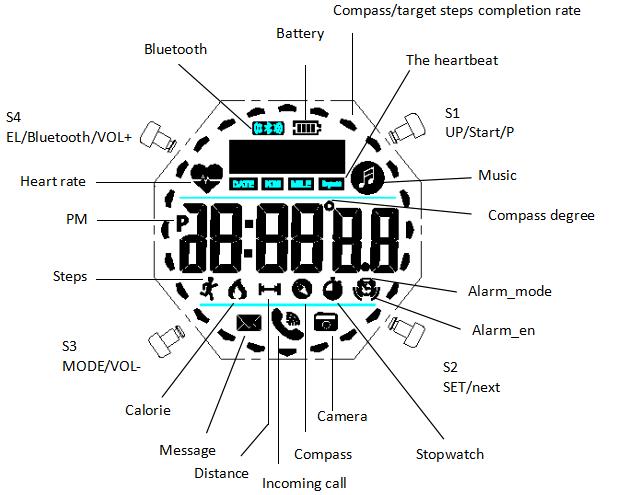
功能:使用說明、SKMEI 1512。Bluetooth錶面示意圖

  • 功能:使用說明。
  • 設定:使用說明。
  • 模式
  • 功能:背光、Bluetooth。
  • 應用程式
  • Bluetooth

A. 功能

  1. 在時間顯示模式中,畫面會顯示星期、小時、分鐘、秒 (6)。
  2. 手錶連接手機後,12/24 小時制會自動與手機同步。
  3. 24 小時精準 3D 計步器可記錄步數、卡路里消耗與距離;連接手機後可將資料上傳至手機。
  4. 功能:心率。
  5. 睡眠
  6. 功能:指南針。
  7. 手錶與手機連線後,可在 App 中設定鬧鐘時間。
  8. 碼錶範圍:23 小時、59 分鐘、59 秒。
  9. 在任何模式中按下 S4,背光會亮起 2 秒。
  10. 可依使用模式開啟或關閉藍牙,以節省電量。
  11. 功能:應用程式、手機、運動、資料。
  12. 功能:使用說明。
  13. 時間、日期與鬧鐘設定會自動與手機同步,不必再逐項手動設定。
  14. 手錶可顯示來電,以及 SMS、QQ、WeChat、Twitter、Facebook、WhatsApp 與 Skype 的訊息通知。
  15. 遙控拍照
  16. 功能:手錶 (12)。

          B. 操作方式

          模式

          按下S1以進入設定。

          How to shutdown smart watch SKMEI 1512

          按下S1以進入模式。

          How to boot smart watch SKMEI 1512

          操作方式

          How to switch mode of smartwatch SKMEI 1512

          Bluetooth

          How to turn on/off Bluetooth of smartwatch SKMEI 1512

          時間: 12 小時、24 小時

          設定:Bluetooth、12 小時、24 小時。

          How to switch 12hr/24hr modes of SKMEI 1512

          使用說明

          1. 在設定模式中,按下S3以離開Bluetooth (12、24)。
          2. 若 10 秒內未操作任何按鍵,手錶會自動返回一般顯示。

          設定:日期設定。

          How to set date of smartwatch SKMEI 1512

          功能:指南針。

          How to turn on compass of smarwatch SKMEI 1512

          功能:指南針、方位 (20、20、12、12、24)。

          功能:校正、指南針。

          1. 1. 在任何模式中按下 S2,背光會亮起 3 秒 (3、24、2)。
          2. 2. 長按S2 3 秒以校正數位、校正、指南針。 秒開始閃爍,此時可進行調整。 按下S2以校正數位、校正。 設定開始閃爍,此時可進行調整。 按下S1以調整設定。 按下S3以確認設定。

          心率

          How to check heart rate with smartwatch SKMEI 1512

          使用說明

          1. 功能:心率、資料。
          2. 功能:手錶。

          模式

          功能:Bluetooth、連線。

          How to play music with smartwatch SKMEI 1512

          長按S3 3 秒以變更Bluetooth、連線、手機。 按下S4。 按下S3。 按下S1。 按下S2。 長按S1以停止碼錶。 長按S1以查看步數、卡路里。 長按S3 3 秒以變更設定。

          設定:碼錶、設定模式。

          How to set stopwatch of smartwatch SKMEI 1512

          使用說明

          1. 碼錶範圍:23 小時、59 分鐘、59 秒 (23、59.99)。
          2. 碼錶到達上限後會從零重新開始,並持續計時直到你將它停止。
          3. 若碼錶正在運作且尚未歸零,切換到其他功能後仍會在背景繼續計時。

          設定:鬧鐘、設定模式。

          How to set alarm  of smartwatch SKMEI 1512


          如何在手機下載並安裝應用程式

          功能:應用程式。

          1. 功能:使用說明。
          2. 功能:使用說明。
          3. 功能:使用說明。


          功能:應用程式。

          1. 功能:使用說明。
          2. 功能:應用程式。
          3. 功能:應用程式。

          How to download APP of smartwatch SKMEI 1512

          應用程式
          功能:應用程式。

          How to install APP of smartwatch SKMEI 1512

          功能:手機、應用程式。

          設定:性別、日期、體重。

           How to use app of smartwatch SKMEI 1512

          功能:Bluetooth、連線。

          設定:Bluetooth、手機、應用程式、連線。

          How to bind smartwatch with mobile phone

          使用說明
          功能:手機、Bluetooth、4 秒 (4.3、4.0)。

          功能:資料、Bluetooth。

          點選分享圖示,再選擇 QQ、WeChat、Facebook 或 Twitter。

          How to share data with smartwatch SKMEI 1512

          功能:資料同步、Bluetooth、連線。

          1. 手錶連接手機後,時間會自動與手機同步。
          2. 功能:資料、步數、卡路里。

          How to synchronize data with Bluetooth connect

          鬧鐘

          How to set reminder with smartwatch SKMEI 1512

          設定:使用說明。

          1. 功能:Bluetooth、時間顯示模式。
          2. 設定:應用程式。

          功能:Bluetooth。

          How to set reminder with smartwatch SKMEI 1512

          使用說明

          1. 在 App 中設定鬧鐘後,手錶會在指定時間震動提醒。
          2. 功能:手錶。

          手機

          按下S1以變更手機、圖示。

          功能:Bluetooth。

          How to use smartphone as remote camera

          功能:步數、手機。

          1. 功能:手機。
          2. 功能:手機、Bluetooth。

          設定:步數、應用程式、Bluetooth、手機、IPHONE6。

          How to unbind smartwatch with iphone

          RELATED ARTICLES