◆Gebruiksaanwijzing voor het horloge SKMEI 1322

Afbeelding van de wijzerplaat: SKMEI 1322.
A. Functies
- Instelling: Stappenteller, Stopwatch, Alarm, Gegevens, Instelmodus.
- Functies: 12-/24-uursnotatie.
- Functies: Alarm, Pieptoon, Geluid, Seconde, 20 seconden, 4KHz.
- Functies: Stappenteller, Tijdweergavemodus, Geluid, Pieptoon, Stopwatch, Alarm, Stappen, 4KHz, 1st (62.5, 50, 2014, 12, 00).
- Functies: Trainingstijd, Calorieën, Waarde.
- Functies: Stappen, Afstand, Calorieën, Waarde.
- Achtergrondverlichting
- Functies: Stappen (6).
- Functies: Instructies (3.0).
B. Bediening
- Functies: Tijdweergavemodus.
- Druk in een willekeurige modus op A om de achtergrondverlichting 3 seconden in te schakelen (3).
- Druk op B om naar geluid, 4KHz over te schakelen (62.5, 50).

Instelling

- Instelling: Instructies.
- Instelling: Jaar, Yr2000 (2099).
Stappenteller
- Druk op D; Instelling knippert.
- Instelling knippert en kan nu worden ingesteld.
- Instelling knippert en kan nu worden ingesteld.
- Druk op C om stappenteller, Stappen, Afstand, Calorieën weer te geven.

- Houd C 2 seconden ingedrukt om Instelling te wijzigen.
- Instelling: Gegevens, Afstand, Calorieën.
- Houd B 2 seconden ingedrukt om metrische eenheden te openen.

Imperiale eenheden
- Instelling: Gewicht, Afstand, 20kg-200kg, 70kg, 40lb-440lb, 154lb, 90cm-240cm, 170cm, 66inch, 20cm-150cm, 60cm (35, 95, 60, 7, 23).
- Functies: Staplengte, Stappen (10, 6, 60).
- In Display toont het display Stappen (10, 10).
- Functies: Dag, Gegevens, 12PM (6).
Stopwatch
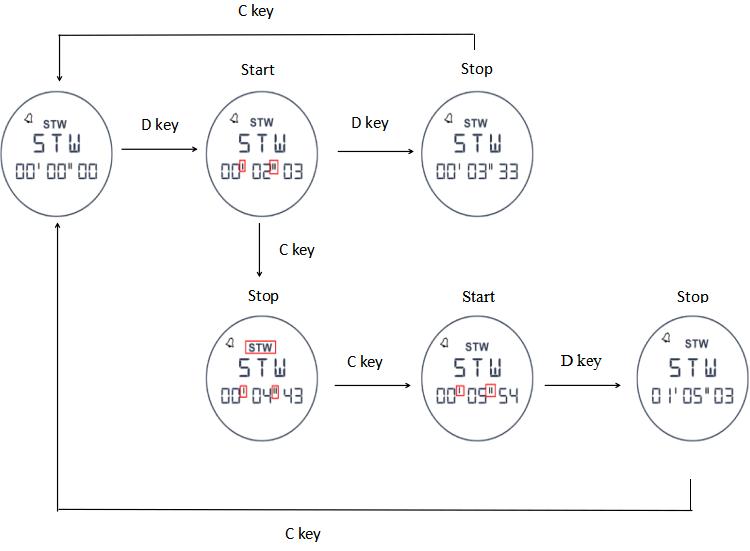
- Functies: Stopwatch (0, 23, 59, 59).
- Druk in Stopwatch op D om stopwatch te starten. Druk nogmaals op dezelfde knop om seconde, Stopwatch te stoppen. Druk op C (00, 00, 00).

Alarm
- Houd B 2 seconden ingedrukt om alarm te openen.

- Alarm
 Wanneer het alarm is ingeschakeld, verschijnt het alarmpictogram in alle standen.
 - Op de ingestelde alarmtijd klinkt het alarm 20 seconden; druk op een willekeurige knop om het te stoppen (4).
- Instelling: Alarm, Geluid.
Gegevens
- Druk op D om dag te openen. Druk nogmaals op dezelfde knop om gegevens te wijzigen (1, 6).
- Druk op D om dag, Gegevens, Stappen, Afstand, Calorieën, Datum weer te geven.

