◆Gebruiksaanwijzing voor het horloge SKMEI 1336
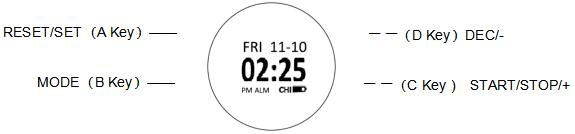
Afbeelding van de wijzerplaat: SKMEI 1336.
A. Functies
- Display
- Functies: Stappenteller, Calorieën, Afstand.
- Kompas
- Herinnering
- De kalender kan worden ingesteld van het jaar 2000 tot en met 2099.
- Functies: Alarm, Uursignaal.
- Aftellen
- Stopwatch
- Functies: 12-/24-uursnotatie, Automatische kalender.
- Dubbele tijd
- Display (3).
B. Modus

Functies: Display, Tijd, 10 seconden.
1. Functies: Tijd, Display.
- Tijd instellen
Druk in de normale tijdweergave op A om te wisselen tussen de 12- en 24-uursnotatie (2).
Druk op B om uur, Minuut, Maand, Dag, Jaar te selecteren.
Druk op D om instelling in te stellen. Instelling knippert en kan nu worden ingesteld. Druk op D. Druk op C.
Druk op A om tijdweergavemodus af te sluiten.
2. Functies: Stappenteller.
- Houd C 3 seconden ingedrukt om stappenteller te stoppen.
- Functies: Stappenteller, Stappen.
- Functies: Stappenteller, Calorieën, Afstand.
- Druk op D om naar instelling over te schakelen (3).
- Druk op B om gewicht, Afstand, Stappen, Herinnering te selecteren.
- Druk op D. Druk op C om herinnering in te schakelen.
- Druk op B om instelmodus te openen. Druk op D. Druk op C. Druk op A om instelmodus af te sluiten.

- Functies: Gegevens, Stappenteller, Dag (24:00).
- Functies: Stappenteller, Gegevens, 2 seconden.
3. Functies: Kompas.
- Druk op C om kompas, Richting in te schakelen.

- Functies: Kompas.
Houd A 3 seconden ingedrukt om display te openen. Instelling knippert en kan nu worden ingesteld. Druk één keer op dezelfde knop om horloge te wijzigen. Druk één keer op dezelfde knop om kompas af te sluiten (1, 1, 12, 2, 2, 6, 6).

4.Dubbele tijd
- Functies: Dubbele tijd, Seconde.
- Houd A 3 seconden ingedrukt om instelmodus te openen. Druk op B om uur, Minuut te selecteren. Druk op D. Druk op C. Druk op A om instelling in te stellen.
5.Alarm
- Houd A 3 seconden ingedrukt om alarm te openen. Druk op B om uur, Minuut te selecteren. Druk op D. Druk op C. Druk op A om instelling in te stellen.
- Functies: Alarm, Uursignaal.
- Druk in Alarm op C om alarm weer te geven.
- Druk op D om uursignaal weer te geven.

6.Stopwatch
- Druk in Stopwatch op C om stopwatch te wijzigen. Druk op C om stopwatch te stoppen. Druk op A.
7.Functies: Timer.
- Houd A 3 seconden ingedrukt om instelmodus te openen. Uur knippert en kan nu worden ingesteld. Druk op B; Minuut knippert. Druk op D. Druk op C. Druk op A om instelling in te stellen.
- Druk op C om timer te starten. Druk op C om stopwatch te stoppen. Druk op A om stopwatch op nul te zetten.
