◆Gebruiksaanwijzing voor het horloge SKMEI 1345
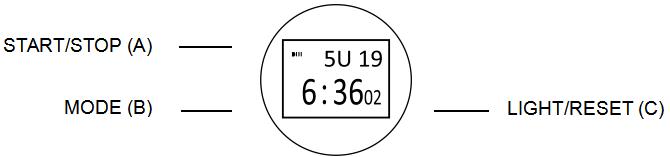
Afbeelding van de wijzerplaat: SKMEI 1345.
A. Functies
- In Display toont het display Uur, Minuut, Seconde, Maand, Dag, Weekdag (10).
- Functies: 12-/24-uursnotatie.
- Functies: Dagelijks alarm, Uursignaal.
- Functies: Stopwatch, Minuut, Seconde, 59 minuten, 59 seconden.
- Functies: Stopwatch, Tussentijd.
- Achtergrondverlichting
B. Bediening

1. Functies: Datum.
- Druk in Tijdweergavemodus op B (drie keer) om instelmodus, Seconde te openen. Seconde knippert en kan nu worden ingesteld. Druk op A om stopwatch op nul te zetten.
- Druk op C om uur, Minuut, Maand, Dag, Weekdag te selecteren.
- Druk op B om instelling in te stellen. Instelling knippert en kan nu worden ingesteld.
- Druk in Tijdweergavemodus op B om tijdweergavemodus af te sluiten.
2. Functies: Alarm.
- Druk in Alarm op B (één keer) om alarm te openen.
- Druk op A (één keer) om alarm in te schakelen. Druk twee keer op dezelfde knop om uursignaal in te schakelen. Druk drie keer op dezelfde knop om alarm in te schakelen. Druk vier keer op dezelfde knop om alarm, Uursignaal uit te schakelen.
- De overige alarmen worden op dezelfde manier ingesteld.

3. Functies: Stopwatch.
- Druk in Tijdweergavemodus op B (twee keer) om stopwatch te openen. Druk op A (één keer) om stopwatch te starten. Druk twee keer op dezelfde knop om stopwatch te stoppen. Druk op C om stopwatch op nul te zetten.
- Druk op A om stopwatch, Tussentijd te starten. Druk op C. Druk op A om timer te stoppen. Druk op C (één keer) om seconde weer te geven. Druk op C (twee keer) om stopwatch op nul te zetten.
