◆Gebruiksaanwijzing voor het horloge SKMEI 1368

Afbeelding van de wijzerplaat: SKMEI 1368.
A. Functies
- De normale tijdweergave toont uren, minuten, seconden, maand, datum en weekdag.
- Functies: 12-/24-uursnotatie.
- Functies: Dagelijks alarm, Uursignaal.
- Functies: Sluimerfunctie.
- Stopwatch met een resolutie van 1/100 seconde en tussentijdfunctie.
- Dubbele tijd
- Functies: Aftellen (23:59:59).
- Achtergrondverlichting
B. Bediening
Druk in Tijdweergavemodus op B om naar tijdweergavemodus, Alarm, Stopwatch, Aftellen over te schakelen.
- Druk in Tijdweergavemodus op D om tijdweergavemodus, 12-/24-uursnotatie te wijzigen.

- Houd A 3 seconden ingedrukt om Achtergrondverlichting in te schakelen.

C. Tijdweergavemodus
- Druk in Tijdweergavemodus op C om tijd instellen te openen. Seconde knippert en kan nu worden ingesteld.
- Druk op B om seconde, Uur, Minuut, Jaar, Maand, Dag in te stellen.

- Druk op D om instelling in te stellen. Houd D ingedrukt om instelling in te stellen.
- Druk op C om instelmodus af te sluiten.
- De weekdag wordt automatisch weergegeven op basis van het ingestelde jaar, de maand en de datum.
Functies: Instructies.Instelling: Alarm.
- Druk op C.

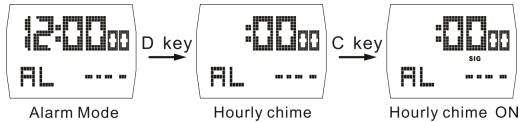
- Druk in Alarm op D om uursignaal te openen. Druk op C om uursignaal uit te schakelen.
- Druk in Alarm op C om alarm, Instelmodus te openen. Uur knippert en kan nu worden ingesteld.
- Druk op B om uur, Minuut, Maand, Dag in te stellen.

- Druk op D om instelling in te stellen. Houd D ingedrukt om instelling in te stellen.
- Druk op C om instelmodus af te sluiten.
Functies: Instructies.Instelling: Stopwatch.

- Druk in Stopwatch op D om stopwatch te stoppen. Druk op C om gegevens op nul te zetten.
- Druk op C om stopwatch, Timer, Tussentijd in te schakelen. Druk op C om stopwatch, Timer af te sluiten.
- Wanneer de stopwatch 59’59”99 bereikt, wordt deze automatisch op nul gezet en begint hij opnieuw.
Functies: Instructies.Dubbele tijd
- Houd Knop ingedrukt om tijd instellen te openen.
- Druk op B om uur, Minuut in te stellen.

- Druk op D om instelling in te stellen. Houd D ingedrukt om instelling in te stellen.
- Druk op C om instelmodus af te sluiten.
Functies: Instructies.Instelling: Aftellen.
Functies: Instructies (23:59.59).
- Houd C 2 seconden ingedrukt om aftellen, Instelmodus te openen. Seconde knippert en kan nu worden ingesteld.
- Druk op B om uur, Minuut in te stellen.

- Druk op D om instelling in te stellen. Houd D ingedrukt om instelling in te stellen.
- Druk op C om instelmodus af te sluiten.
- Wanneer het aftellen 00:00.00 bereikt, verdwijnt het aftelpictogram en klinkt het alarm 15 seconden. Druk op een willekeurige knop om het te stoppen.
- Nadat het alarm is gestopt, toont het display opnieuw de ingestelde beginwaarde van de aftelling.
