◆Gebruiksaanwijzing voor het horloge SKMEI 1373

Afbeelding van de wijzerplaat: SKMEI 1373.
A. Functies
- Functies: Digitaal, Kompas.
- Stappen
- Functies: Seconde, Stappen, 9 seconden.
- In Normale weergave toont het display Calorieën (4).
- Functies: Metrische eenheden, Gewicht, Tempo, Sensor.
- Stappen
- Functies: Instructies (30).
- Tempo
- In Display toont het display Weekdag (2000, 1, 1, 2099, 12, 31).
- Functies: 12-/24-uursnotatie.
- Alarm (3).
- Tijd
- Functies: Stopwatch, Uur, 99 uur, 59 minuten, 59 seconden, 99ms.
- Functies: Aftellen, Uur, 99 uur, 59 minuten, 59 seconden.
- Wereldtijd
- Achtergrondverlichting
B. Bediening

1. Druk in een willekeurige modus op A om de achtergrondverlichting 4 seconden in te schakelen.
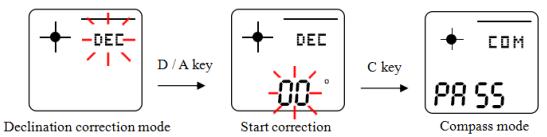
2. Instelling: Digitaal, Kompas.
- Druk op C om kompas te openen. Druk op D (één keer) om kompas, Seconde, Richting weer te geven (0, 359).

- Houd C 2 seconden ingedrukt om kompas, Instelmodus te openen.
- Druk op B om kompas in te stellen. Instelling knippert en kan nu worden ingesteld.

- Druk op D om kompas, Uurwerk te starten (2).

- Functies: Kompas (2).
- Druk op D.
- Druk op D om de waarde te verlagen (90).
3.Instelling
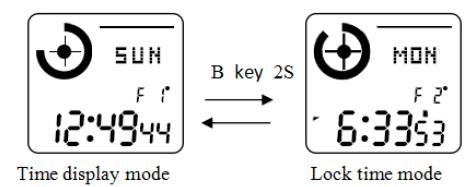
- Druk in Tijdweergavemodus op D om tijdweergavemodus af te sluiten (8).

- Druk op C om naar 12-/24-uursnotatie over te schakelen (2).

- Druk op D om naar 12-/24-uursnotatie over te schakelen.
- Druk op D om de waarde te verhogen. Druk op A om de waarde te verlagen (2).
- Instelling: Jaar, Maand, Weekdag.
- Houd C 60 seconden ingedrukt om tijd, Display af te sluiten.
- Instelling: Tijdweergavemodus, 2 seconden.
4.Stappenteller
- Druk op C (één keer) om naar stappen, Calorieën over te schakelen.
- Functies: Stappen, Stappenteller, 2 seconden.

- Instelling: Stappen, 2 seconden.

- Functies: Stappen, Waarde, 3 seconden.
- Functies: Dag, AM12 (0:00, 00).
Instelling: Stappen, Instelmodus.
- Instelling: Stappen, 2 seconden.
- Druk op B (één keer) om naar metrische eenheden, Gewicht, Tempo, Sensor over te schakelen. Seconde knippert en kan nu worden ingesteld. Druk op C om de instelling te bevestigen.

- Druk op D om waarde af te sluiten.
- Gewichtsinstelling: de standaardwaarde is 60KG (132LB) en het instelbereik is 30-200KG of 66-440LB.
- Staplengte: de standaardwaarde is 70CM (28INCH) en het instelbereik is 30-150CM of 12-59INCH.
- Functies: Sensor, Waarde.
- Druk op D om waarde, Metrische eenheden, Sensor in te stellen (2).
- Instelling: Instelmodus, 30 seconden.
5. Functies: Gegevens.
- Functies: Dag (0:00.00).
- Functies: Datum, Metrische eenheden, Gegevens, Eenheid.
- Druk op D om geschiedenis weer te geven.
- Druk op C om calorieën weer te geven.
- Gegevens
- Als er 30 seconden lang geen knop wordt bediend, keert het horloge automatisch terug naar Tijdweergavemodus.
6.Stopwatch
- Druk in Stopwatch op D om stopwatch, Seconde te starten. Druk op D om seconde, Stopwatch te stoppen. Druk op C.
- Seconde

- Tijd

- Tijd (2).

- Functies: Seconde, Alarm (99:59, 0:00, 99, 59, 00, 00).
- Als er 1 minuten lang geen knop wordt bediend, keert het horloge automatisch terug naar Tijdweergavemodus.
- In Display toont het display Seconde (60).
7.Alarm
- Druk in Alarm op C om naar alarm over te schakelen (1, 2, 3).
- Druk in Alarm op D om alarm uit te schakelen.
- Druk in Alarm op B om alarm, Instelmodus, Uur te openen (2).

- Druk op D om instelling te wijzigen (2).
- Druk op C om de instelling te bevestigen. Als er 60 seconden lang geen knop wordt bediend, slaat het horloge de instellingen automatisch op en keert het terug naar Tijdweergavemodus.
- Op de ingestelde tijd klinkt het alarm en stopt het automatisch na 1 minuten.
- Druk op D om tijd, Modus, Functie in te schakelen.
8.Aftellen
- Druk in Aftellen op B om instelling te openen (2).

- Druk op D om waarde in te stellen.
- Druk op C om instelling in te stellen.
- Druk op D om aftellen, Waarde, Timer in te schakelen. Druk op C om tijd instellen, Waarde af te sluiten (0, 0).
- Wanneer het aftellen 0:00 bereikt, klinkt het alarm 1 minuten. Daarna wordt de timer automatisch teruggezet op de beginwaarde (00).
- Als er 60 seconden lang geen knop wordt bediend, keert het horloge automatisch terug naar Tijdweergavemodus.
- In Aftellen toont het display Seconde (60).
9. Functies: Tempo.
- Druk op D om tempo in te schakelen.
- Houd C 2 seconden ingedrukt om instelling te openen.
- Druk op D. Houd D 2 seconden ingedrukt om instelling te wijzigen.
- Instelling: Tempo (30, 180).
- Druk op C om de instelling te bevestigen. Als er 60 seconden lang geen knop wordt bediend, slaat het horloge de instellingen automatisch op en keert het terug naar Tijdweergavemodus.
- Druk op C.
- Instelling: Alarm, Geluid.
10. Functies: Wereldtijd.
- Functies: Wereldtijd, 1 seconden.
- Druk op D (2).
- Druk op C om zomertijd in te schakelen.
- Functies: Wereldtijd.
- In Display toont het display Uur.
- In Display toont het display Datum.
- In Normale weergave keert het horloge niet automatisch terug naar de tijdweergave; daarvoor moet u een knop indrukken.
