Functies: Instructies, SKMEI 1629. Instructies
Display

- Functies: Instructies.
- Instelling: Instructies.
- Functies: Modus.
- Functies: Achtergrondverlichting, Bluetooth.
Functie
- In Tijdweergavemodus toont het display Weekdag, Uur, Minuut, Seconde (8).
- Wanneer het horloge met de telefoon is verbonden, wordt de 12/24-uursnotatie automatisch gesynchroniseerd.
- De nauwkeurige 3D-stappenteller registreert 24 uur per dag stappen, calorieverbruik en afstand. Na het verbinden kunnen de gegevens naar de telefoon worden overgedragen.
- De alarmtijd kan in de app worden ingesteld wanneer het horloge met de telefoon is verbonden.
- Bereik voor Stopwatch: 23 uur, 59 minuten, 59 seconden.
- Druk in een willekeurige modus op S4 om de achtergrondverlichting 2 seconden in te schakelen.
- Wanneer de batterijspanning lager is dan 2.4 V, knippert het pictogram voor een bijna lege batterij als herinnering om de batterij te vervangen.
- Bluetooth kan afhankelijk van de gebruiksmodus worden in- of uitgeschakeld om energie te besparen.
- Functies: Training, Gegevens, App, Telefoon.
- Functies: App, Telefoon, Training, Gegevens.
- Tijd, datum en alarm worden automatisch met de telefoon gesynchroniseerd, zodat handmatig instellen niet nodig is.
- Het horloge meldt oproepen en berichten van SMS, QQ, WeChat, Twitter, Facebook, WhatsApp en Skype.
- Functies: Camera-afstandsbediening, App.
Modus
Houd S1 ingedrukt om modus, Tijd te wijzigen.


Bluetooth

Functies: Batterij bijna leeg.
Datum instellenFuncties: Instructies.
Druk in Tijdweergavemodus op S3 om naar datum over te schakelen. Houd S2 3 seconden ingedrukt om datum instellen te openen. Druk op S2 om jaar, Maand, Dag te selecteren. Druk op S1 om instelling in te stellen. Druk op S3 om jaar, Maand, Dag, Weekdag af te sluiten (10, 2).

- De kalender kan worden ingesteld van het jaar 2000 tot en met 2099.
- Als er 10 seconden lang geen knop wordt bediend, keert het horloge automatisch terug naar Normale weergave.
- Druk in Instelmodus op S3 om instelmodus af te sluiten.
Instelling: Alarm, Instelmodus.
Druk in Alarm op S3 om naar alarm over te schakelen. Houd S2 3 seconden ingedrukt om alarm te openen. Druk op S2; Uur knippert. Druk op S1 om alarm uit te schakelen. Druk op S3 om de instelling te bevestigen.
 Functies: Alarm.
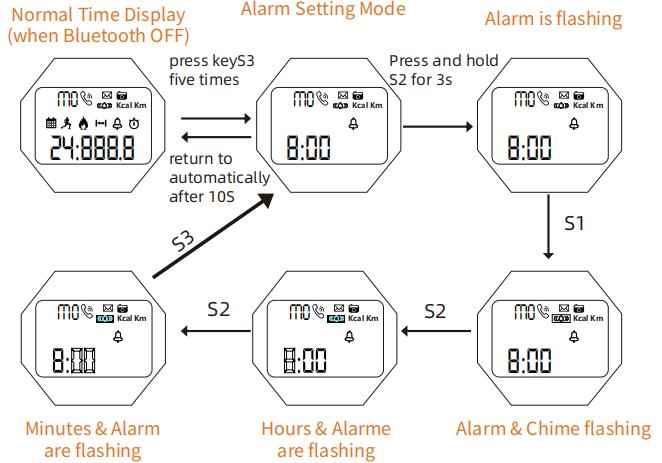
Instructies
Op de ingestelde tijd klinkt het alarm en stopt het automatisch na 6 seconden.
Achtergrondverlichting
Druk in een willekeurige modus op S4 om de achtergrondverlichting 2 seconden in te schakelen.
Instelling: Stopwatch, Instelmodus.
Druk in Tijdweergavemodus op S3 om naar instelling over te schakelen.
Druk op S1 om stopwatch te stoppen.
Druk op S2.
Druk op S2 om stopwatch te starten.
Druk op S2 om stopwatch te hervatten.
Functies: Seconde, Tijdweergavemodus, 10 seconden.
Druk op S1 om digitaal te stoppen.
Uurwerk
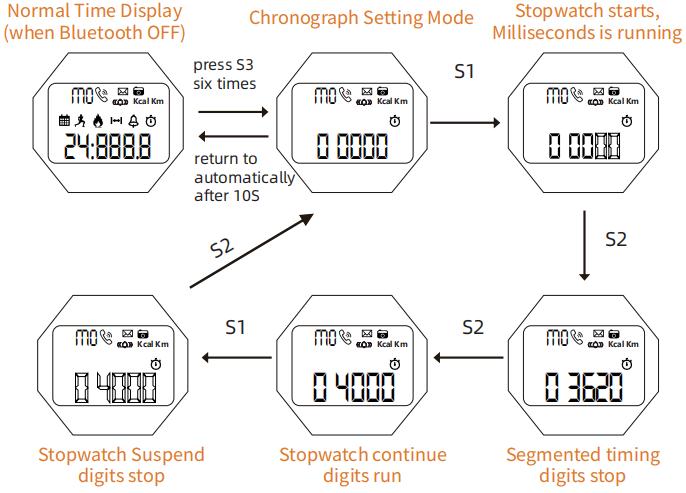
Instructies
- Functies: Stopwatch (59, 59, 59).
- Wanneer de meting de maximumwaarde bereikt, begint de stopwatch opnieuw vanaf nul en loopt hij door.
- Als de stopwatch loopt en niet is gereset, blijft hij op de achtergrond doorlopen wanneer u naar een andere functie schakelt.
Bediening
Bediening

Instelling: 12-/24-uursnotatie.
Druk op S2 om naar 12-/24-uursnotatie over te schakelen (3).

Instructies
- Druk in Instelmodus op S3 om bluetooth af te sluiten (12, 24).
- Als er 10 seconden lang geen knop wordt bediend, keert het horloge automatisch terug naar Normale weergave.
Functies: Datum, Training, Gegevens.
Als Bluetooth is uitgeschakeld, kunt u de activiteitsgegevens van de huidige dag op het horloge bekijken.

Instructies
- Functies: Datum, Dag, am-23 (0:00, 59).
- Functies: Stappenteller, Stappen, 24 uur (10).
App
Functies: App.

Functies: App, Gegevens.

Functies: Bluetooth, Verbinding.
Instelling: Telefoon, Bluetooth, App, Pictogram, Verbinding (1, 2, 3, 4).

Functies: Gegevenssynchronisatie, Bluetooth, Verbinding.
- Wanneer het horloge met de telefoon is verbonden, wordt de tijd automatisch gesynchroniseerd.
- Functies: Gegevens, Training, Stappen, Calorieën.
- Alarm
- Instelling: Instructies.
Instructies
- 1. Op de ingestelde tijd klinkt het alarm en stopt het automatisch na 6 seconden.
- 2. Functies: Pieptoon.

Functies: Gegevenssynchronisatie, Bluetooth, Verbinding.
Functies: Verbinding, Bluetooth, Gegevens, Melding, App.
Functies: Telefoon, Stappen.
- Functies: App.
- Functies: Telefoon, Bluetooth, Verbinding, App (7).

