Functies: Instructies, SKMEI 1743. Instructies
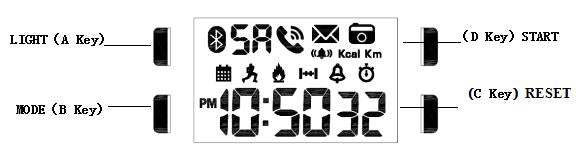
Afbeelding van de wijzerplaat: SKMEI 1743.
- Functies: Achtergrondverlichting, Bluetooth.
- Functies: Modus.
- Instelling: Instructies.
- Functies: Instructies.
Functie
1. Horloge
- Functies: Instructies (0).
- Wanneer het horloge met de telefoon is verbonden, wordt de tijd automatisch gesynchroniseerd.
- Functies: Verbinding, Telefoon, Melding, Camera-afstandsbediening.
- In Display toont het display Uur, Minuut, Seconde, Dag, Maand, Weekdag (12).
- Functies: Alarm, App.
- Functies: Stappen, Calorieën, Afstand, Gegevens, Dag.
- Bereik voor Stopwatch: 23 uur, 59 minuten, 59 seconden.
- Functies: 12-/24-uursnotatie, Automatische kalender.
- Achtergrondverlichting
2. App
- Functies: App, Training, Gegevens.
- Instelling: Training, App.
- Functies: App, Telefoon, Training, Gegevens, Uurwerk.
- Instelling: App, Herinnering, Telefoon.
Modus
Druk op S om horloge, Tijd, Display in te schakelen.
Druk op S om horloge, Tijd, Display weer te geven.
Bluetooth
- Houd A 3 seconden ingedrukt om bluetooth in te schakelen.
- Instelling knippert en kan nu worden ingesteld.
- Instelling knippert en kan nu worden ingesteld.

Instelling: Datum instellen.
- Druk in Tijdweergavemodus op B (één keer) om datum te openen. Houd C 3 seconden ingedrukt om datum instellen te openen. Seconde knippert en kan nu worden ingesteld.
- Druk op C om instelling te selecteren.
- Druk op D om waarde in te stellen. Houd dezelfde knop ingedrukt om instelling in te stellen.
- Druk op B om tijdweergavemodus af te sluiten. Als er 15 seconden lang geen knop wordt bediend, slaat het horloge de instellingen automatisch op en keert het terug naar Tijdweergavemodus.

Instelling: Alarm, Instelmodus.
- Houd C 3 seconden ingedrukt om alarm te openen. Seconde knippert en kan nu worden ingesteld.
- Druk op C om instelling te selecteren.
- Druk op D om instelling in te schakelen. Houd D ingedrukt om instelling te wijzigen.
- Druk op B om tijdweergavemodus af te sluiten. Als er 15 seconden lang geen knop wordt bediend, slaat het horloge de instellingen automatisch op en keert het terug naar Tijdweergavemodus.

Instelling: Stopwatch, Instelmodus.
- Druk in Stopwatch op D om stopwatch te starten. Druk op D om stopwatch te stoppen.
- Druk op C om stopwatch te wijzigen.
- Druk op B om tijdweergavemodus af te sluiten.

Bediening
- Druk in Tijdweergavemodus op B om naar functie, Modus over te schakelen.
- Druk op B om stappen, Calorieën, Afstand weer te geven.
- Als er 15 seconden lang geen knop wordt bediend, keert het horloge automatisch terug naar Tijdweergavemodus.
- Houd A 3 seconden ingedrukt om bluetooth in te schakelen.

Achtergrondverlichting
Druk in een willekeurige modus op A om de achtergrondverlichting 3 seconden in te schakelen.
Instelling
- Houd C 3 seconden ingedrukt om tijd instellen te openen. Seconde knippert en kan nu worden ingesteld.
- Druk op C om instelling te selecteren.
- Druk op D om instelling in te schakelen. Houd D ingedrukt om instelling te wijzigen.
- Druk op B om tijdweergavemodus af te sluiten. Als er 15 seconden lang geen knop wordt bediend, slaat het horloge de instellingen automatisch op en keert het terug naar Tijdweergavemodus.

Functies: Instructies.
- Functies: Telefoon, Seconde, Training, Gegevens, Bluetooth, Verbinding, 300 seconden.
- Functies: Minuut, Slaap, Batterij bijna leeg, 3 minuten.
App
1、 Functies: App.

