

◆Mode d’emploi de la montre SKMEI 1512
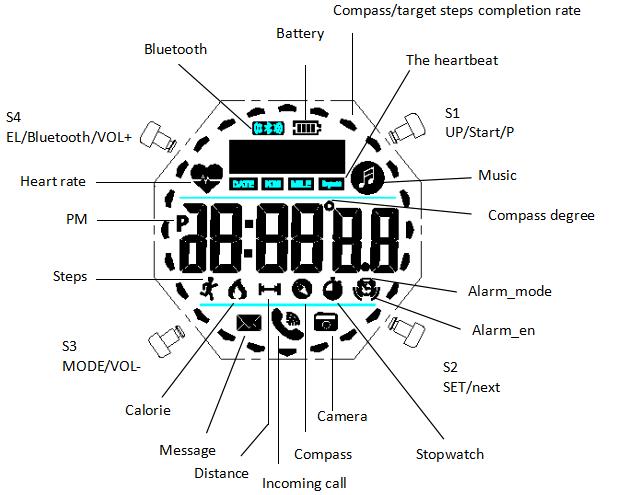
Fonctions : Instructions, SKMEI 1512.BluetoothSchéma du cadran
- Fonctions : Instructions.
- Réglage : Instructions.
- Mode
- Fonctions : Rétroéclairage, Bluetooth.
- Application
- Bluetooth
A. Fonction
- En Mode d’affichage de l’heure, l’écran affiche Jour de la semaine, Heure, Minute, Seconde (6).
- Lorsque la montre est connectée au téléphone, le format 12/24 heures se synchronise automatiquement.
- Le podomètre 3D précis sur 24 heures suit les pas, les calories dépensées et la distance. Une fois la connexion établie, les données peuvent être transférées vers le téléphone.
- Fonctions : Fréquence cardiaque.
- Sommeil
- Fonctions : Boussole.
- L’heure de l’alarme peut être réglée dans l’application lorsque la montre est connectée au téléphone.
- Plage de Chronomètre : 23 heures, 59 minutes, 59 secondes.
- Dans n’importe quel mode, appuyez sur S4 pour allumer le rétroéclairage pendant 2 secondes.
- Le Bluetooth peut être activé ou désactivé selon le mode d’utilisation afin d’économiser la batterie.
- Fonctions : Application, Téléphone, Exercice, Données.
- Fonctions : Instructions.
- L’heure, la date et l’alarme se synchronisent automatiquement avec le téléphone, sans réglage manuel fastidieux.
- La montre vous avertit des appels et des messages provenant de SMS, QQ, WeChat, Twitter, Facebook, WhatsApp et Skype.
- Déclencheur photo à distance
- Fonctions : Montre (12).
B. Utilisation
Mode
Appuyez sur S1 pour accéder à réglage.

Appuyez sur S1 pour accéder à mode.

Utilisation

Bluetooth

Heure: 12 heures, 24 heures
Réglage : Bluetooth, 12 heures, 24 heures.

Instructions
- Dans Mode de réglage, appuyez sur S3 pour quitter bluetooth (12, 24).
- Si aucune touche n’est actionnée pendant 10 secondes, la montre revient automatiquement à Affichage normal.
Réglage : Réglage de la date.

Fonctions : Boussole.

Fonctions : Boussole, Direction (20, 20, 12, 12, 24).
Fonctions : Étalonnage, Boussole.
- 1. Dans n’importe quel mode, appuyez sur S2 pour allumer le rétroéclairage pendant 3 secondes (3, 24, 2).
- 2. Maintenez S2 enfoncé pendant 3 secondes pour étalonner numérique, Étalonnage, Boussole. Seconde clignote et peut maintenant être réglé. Appuyez sur S2 pour étalonner numérique, Étalonnage. Réglage clignote et peut maintenant être réglé. Appuyez sur S1 pour régler réglage. Appuyez sur S3 pour valider le réglage.
Fréquence cardiaque

Instructions
- Fonctions : Fréquence cardiaque, Données.
- Fonctions : Montre.
Mode
Fonctions : Bluetooth, Connexion.

Maintenez S3 enfoncé pendant 3 secondes pour modifier bluetooth, Connexion, Téléphone. Appuyez sur S4. Appuyez sur S3. Appuyez sur S1. Appuyez sur S2. Maintenez S1 enfoncé pour arrêter chronomètre. Maintenez S1 enfoncé pour afficher pas, Calories. Maintenez S3 enfoncé pendant 3 secondes pour modifier Réglage.
Réglage : Chronomètre, Mode de réglage.

Instructions
- Plage de Chronomètre : 23 heures, 59 minutes, 59 secondes (23, 59.99).
- Le chronomètre continue de fonctionner et repart de zéro lorsqu’il atteint sa limite, jusqu’à ce que vous l’arrêtiez.
- Si le chronomètre fonctionne sans avoir été remis à zéro, il continue en arrière-plan lorsque vous passez à une autre fonction.
Réglage : Alarme, Mode de réglage.

Télécharger et installer l’application sur le téléphone
Fonctions : Application.
- Fonctions : Instructions.
- Fonctions : Instructions.
- Fonctions : Instructions.
Fonctions : Application.
- Fonctions : Instructions.
- Fonctions : Application.
- Fonctions : Application.

Application
Fonctions : Application.

Fonctions : Téléphone, Application.
Réglage : Sexe, Date, Poids.

Fonctions : Bluetooth, Connexion.
Réglage : Bluetooth, Téléphone, Application, Connexion.

Instructions
Fonctions : Téléphone, Bluetooth, 4 secondes (4.3, 4.0).
Fonctions : Données, Bluetooth.
Touchez l’icône de partage, puis choisissez QQ, WeChat, Facebook ou Twitter.

Fonctions : Synchronisation des données, Bluetooth, Connexion.
- Lorsque la montre est connectée au téléphone, l’heure se synchronise automatiquement.
- Fonctions : Données, Pas, Calories.

Alarme

Réglage : Instructions.
- Fonctions : Bluetooth, Mode d’affichage de l’heure.
- Réglage : Application.
Fonctions : Bluetooth.

Instructions
- Une fois l’alarme réglée dans l’application, la montre vibre à l’heure choisie.
- Fonctions : Montre.
Téléphone
Appuyez sur S1 pour modifier téléphone, Icône.
Fonctions : Bluetooth.

Fonctions : Pas, Téléphone.
- Fonctions : Téléphone.
- Fonctions : Téléphone, Bluetooth.
Réglage : Pas, Application, Bluetooth, Téléphone, IPHONE6.
