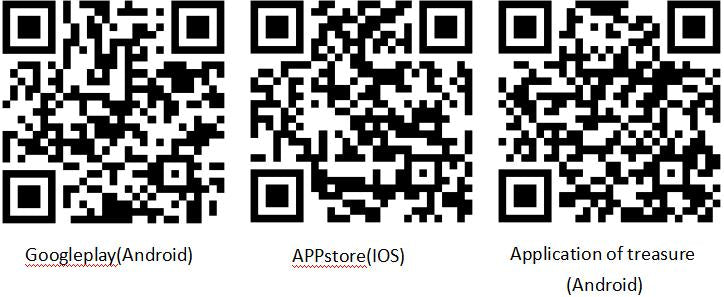
◆Mode d’emploi de la montre SKMEI 1542
A. Affichage
- Fonctions : Rétroéclairage, Bluetooth.
- Fonctions : Mode, Fonction.
- Fonctions : Instructions.
- Fonctions : Instructions.
Instructions
- Appuyez sur A pour diminuer la valeur.
- Appuyez sur C pour augmenter la valeur.

Fonctions : Instructions.Fonctions : Fonction.
- En Affichage, l’écran affiche Jour de la semaine, Heure, Minute, Seconde, Jour, Mois (14).
- Lorsque la montre est connectée au téléphone, le format 12/24 heures se synchronise automatiquement.
- Le podomètre 3D précis sur 24 heures suit les pas, les calories dépensées et la distance. Une fois la connexion établie, les données peuvent être transférées vers le téléphone.
- Fonctions : Sommeil, Téléphone, Jour, Données.
- L’heure de l’alarme peut être réglée dans l’application lorsque la montre est connectée au téléphone.
- Plage de Chronomètre : 23 heures, 59 minutes, 59 secondes.
- Dans n’importe quel mode, appuyez sur A pour allumer le rétroéclairage pendant 3 secondes.
- Le Bluetooth peut être activé ou désactivé selon le mode d’utilisation afin d’économiser la batterie.
- Fonctions : Téléphone, Application, Données.
- Fonctions : Données, Application (7).
- L’heure, la date et l’alarme se synchronisent automatiquement avec le téléphone, sans réglage manuel fastidieux.
- Fonctions : Instructions.
- Déclencheur photo à distance
- Fonctions : Téléphone.
- Fonctions : Téléphone.
- Fréquence cardiaque
Fonctions : Instructions.Fonctions : Instructions.
Mode

Bluetooth

Fonctions : Jour, Exercice, Données.

Instructions
- Fonctions : Date, Jour, am-23, 59pm (0:00).
- Fonctions : Podomètre, Pas, 24 heures (11).
Réglage : Alarme, Mode de réglage.

Instructions
- Réglage clignote et peut maintenant être réglé (20, 20).
- Appuyez sur C pour passer à alarme.

Réglage : Chronomètre, Mode de réglage.

Instructions
- Fonctions : Chronomètre, Seconde (23:59, 23, 59.99, 59.99).
- Le chronomètre continue de fonctionner et repart de zéro lorsqu’il atteint sa limite, jusqu’à ce que vous l’arrêtiez.
- Si le chronomètre fonctionne sans avoir été remis à zéro, il continue en arrière-plan lorsque vous passez à une autre fonction.
Réglage : Heure, 24 heures (12).

Instructions
- Dans Mode de réglage, appuyez sur B pour quitter bluetooth (12, 24).
- Si aucune touche n’est actionnée pendant 5 secondes, la montre revient automatiquement à Affichage normal.
Réglage : Instructions.

Déclencheur photo à distance
- Réglage clignote et peut maintenant être réglé.
- Fonctions : Montre.

Fréquence cardiaque

Instructions
- Fonctions : Fréquence cardiaque.
- Fréquence cardiaque: 15 secondes
- Fonctions : Valeur.
Fonctions : Instructions.Fonctions : Application.
1.1) Fonctions : Application, Téléphone, V10.
Fonctions : Application, Bluetooth.
Réglage : Bluetooth, Téléphone.


1.2)Application
- Fonctions : Application.
- Fonctions : Application.
2. Fonctions : Application, Connexion.
Fonctions : Application.
Réglage : Instructions.
Fonctions : Téléphone, Bluetooth.
Fonctions : Connexion, Application.
Fonctions : Instructions.
Fonctions : Pile, Application.


Fonctions : Bip.

Maintenez C enfoncé pendant 3 secondes pour connecter connexion, Téléphone, Son.
Instructions
- Fonctions : Téléphone, Son.
- Fonctions : Téléphone.
- Fonctions : Fonction.
Réglage clignote et peut maintenant être réglé.
Fonctions : Données.

Fonctions : Fréquence cardiaque, Seconde, 15 secondes.

- Appuyez sur C pour démarrer fréquence cardiaque, Application.
- Fonctions : Connexion, Application, Fréquence cardiaque.
8. Réglage : Instructions.
Réglage : Sommeil.

9.Rappel
Fonctions : Rappel, Téléphone, Notification, Application.
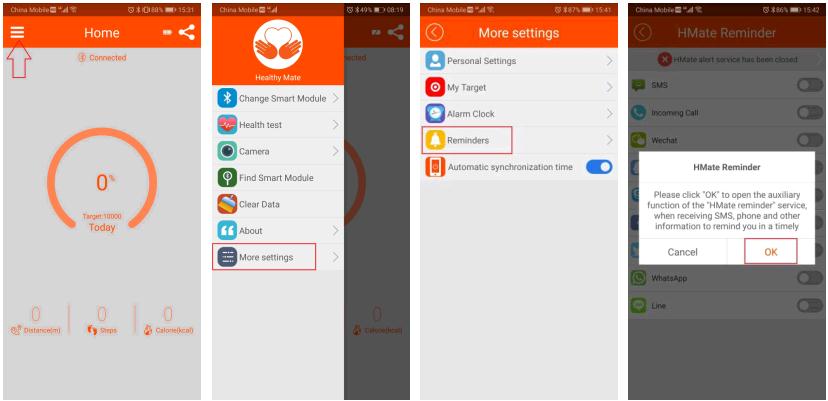

Instructions
Fonctions : Application.
- Bluetooth
- Fonctions : Téléphone.
- Fonctions : Rappel.
- Fonctions : Instructions.
- Réglage : Téléphone.
- Fonctions : Téléphone, Rappel, Bluetooth, Connexion, Application.

10. Fonctions : Synchronisation des données, Sommeil, Données.
Lorsque la montre est connectée au téléphone, l’heure se synchronise automatiquement.

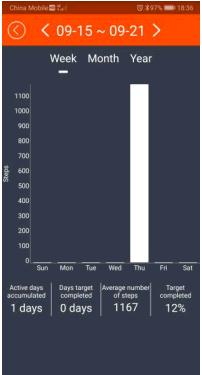
11. Fonctions : Instructions.
Fonctions : Instructions.

12.Application
Fonctions : Instructions.

Fonctions : Instructions.Application