◆Gebruiksaanwijzing voor het horloge SKMEI 1019

Afbeelding van de wijzerplaat: SKMEI 1019.
A. Functies
- Display: 12 Cijfers, Uur, Minuut, Seconde, Maand, Datum, Weekdag.
- Functies: Dagelijks alarm, Uursignaal.
- Functies: 12-/24-uursnotatie, Automatische kalender.
- Stopwatch met een resolutie van 1/100 seconde en tussentijdfunctie.
- Achtergrondverlichting
B. Bediening
- Druk in een willekeurige modus op A om de achtergrondverlichting 3 seconden in te schakelen.
- Druk op B om naar modus over te schakelen.
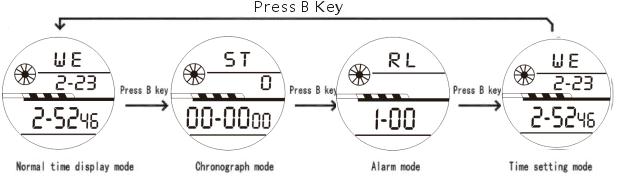
1) Functies: Stopwatch.

2)Functies: Alarm, Uursignaal.
- Druk in Normale modus op B (twee keer) om alarm te openen. Druk op D om functie te wijzigen.
- Wanneer het pictogram ALM/SIG verschijnt, staat Alarm, Uursignaal aan; wanneer het verdwijnt, staat de functie uit.
3)Alarm
- Druk in Normale modus op B (twee keer) om alarm te openen. Druk op C; Uur knippert.
- Druk op D om uur, Alarm in te stellen.
- Minuut knippert en kan nu worden ingesteld. Druk op D om minuut, Alarm in te stellen. Druk op B om instelmodus af te sluiten.
4)Instelling
Druk in Normale modus op B (drie keer) om instelmodus, Seconde te openen. Seconde knippert en kan nu worden ingesteld. Druk op D om stopwatch op nul te zetten.
- Uur knippert en kan nu worden ingesteld. Druk op D om uur in te stellen.
- Minuut knippert en kan nu worden ingesteld. Druk op D om minuut in te stellen.
- Maand knippert en kan nu worden ingesteld. Druk op D om maand in te stellen.
- Datum knippert en kan nu worden ingesteld. Druk op D om datum in te stellen.
- Weekdag knippert en kan nu worden ingesteld. Druk op D om dag in te stellen.
- Druk op B om instelmodus af te sluiten.
Functies: Instructies.Gebruiksaanwijzing voor het horloge 12 digits
