◆SKMEI 1122 Watch Instruction
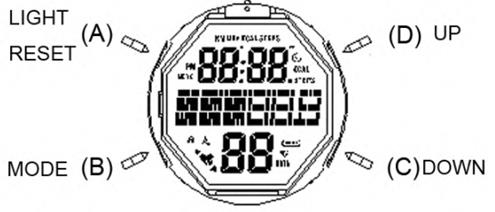
(SKMEI 1122 Pedometer Watch Dial)
1. Functions
- Hour, Minutes, Second, Week, Date, Year
- Dailly alarm & Hourly chime
- 12/24HR format
- 1/100 Second Chronograph(stop watch)
- Countdown
- Pedometer mode,calories/ distance mode;
- EL backlight (press A key for EL backlight ON 3 second)
- 50 meters deep of waterproof. (Can wear bathing swimming and general housework, but cannot action buttons in the water)
- Lock screen function: Hold D key 3 seconds to lock/ unlock the screen. (If lock function ON will to display the icon "
 ", otherwise will disappear)
2. Pedometer mode Function
1. In normal time Mode, Press B key to convert the Pedometer function as following:
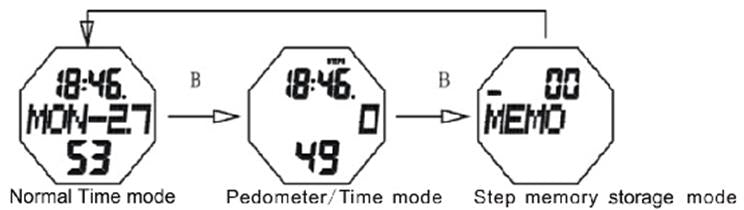
- When you enter into Pedometer function, hold D key 3 seconds to lock/ unlock in pedometer function convert. (If the icon appear means lock, otherwise means unlock)
- When Pedometer function ON and you complete the exercise, hold A key for 3s, the screen will be flashing “ERASE”, press A key again to clear the steps record to zero.
2. In the Pedometer mode, press D key to convert as following:
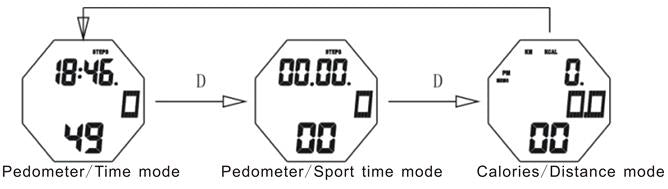
- In the pedometer/time mode, On the to of screen show the current time “hour & minute”, on the bottom show current time “second”. In the central show the record of steps, the maximum steps is 999999.
- In the pedometer / sport time mode, On the to of screen show the sport time “hour & minute”, on the bottom show sport time “second”, maximum sport time is 23:59.59.In the central show the record of steps.
- In the calories /distance mode, On the top of screen show the integer distance(0.KM), on the bottom show the decimals distance(.00KM), maximum distance is 9999.99KM. In the central of screen show the show the Calories, the maximum calories is 99999.9
3. Margin of error in pedometer function
- In the beginning 7 seconds keep action, will have 5~10 steps deviation is allowed.
- While the user stops running/walking but the hands still moving, which also will be record in to the pedometer.
- Each minutes running/walking 80~130 steps could be record , if exceed this value, the accuracy shall be in doubt.
- When you are walking /running, the hands should swing in the same frequency as the feet, otherwise the accuracy of the steps recorded will not be correct.
- As each person has different action when running/walking, then the margin of error will different.
4. User’s information setting
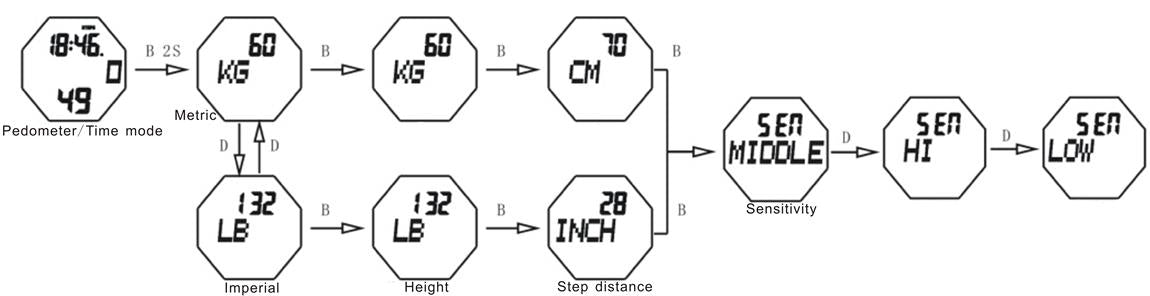
- In pedometer mode, hold B key 2 seconds enter user’s information setting mode, and the KG / LB (weight) flashing, (press D or C key to convert the format in KG or LB)
- Press B key again, the KG / LB data flashing, press C(down) or D (up)to set your weight.
- Press B key again, the CM / INCH data flashing, press C(down) or D (up ) to set your step distance.
- Press B key again, the Sensitivity data flashing, press C(down) or D (up)to adjust it in grade LOW/MIDDLE/HI
Note: Theoretical Step distance calculation method:
- For male : theoretical step distance =height(CM) * 0.415
- For female : theoretical step distance =height(CM) *0.413
- If you don’t want to use theoretical step distance method, you can use a ruler to measure your step distance.
5. Steps record storage mode
- In normal time mode, press B key twice enter into steps record storage mode. In the central show the sport date. on the top and bottom, the steps & calories & distance data will take turns in each minute to show as following:
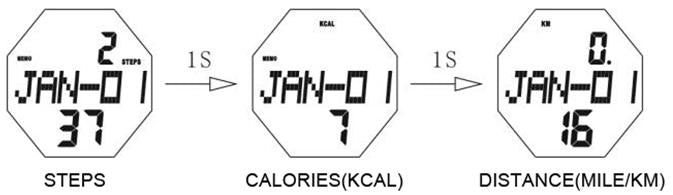
- In this step record mode Press D or C key to upward / downward view the historical records.
- Hold A for 2 seconds, the “ERASE” flashing, press A key to clear the historical exercise record.
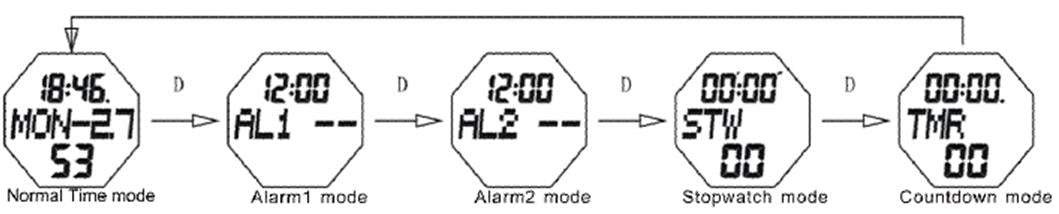
In normal time Mode, Press D key to convert the mode as following:
1.Time Mode and Hourly Chime
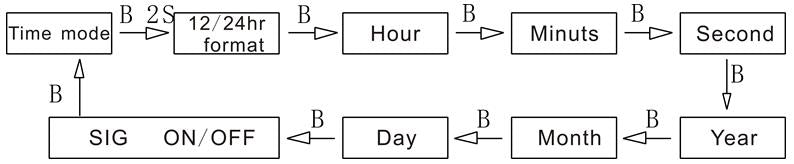
- In normal time mode, hold B key 2 seconds enter into time setting mode, and 12/24H flashing, press C(down) or D(up)to convert the 12/24H format
- Press B again “hour” flashing , press C(down) or D(up)to adjust “hour”
- Press B again “minutes” flashing, press C(down) or D(up)to adjust “minutes”
- Press B again “second” flashing, press C(down) or D(up)to “second” to zero
- Press B again “year”flashing, press C(down) or D(up)to adjust “year”
- Press B again “month” flashing, press C(down) or D(up)to adjust “month”
- Press B again “day” flashing, press C(down) or D(up)to adjust “day”
- Press B again “SIG ” flashing, press C(down) or D(up)to ON/ OFF hourly chime
- Press B again to exit
2.Alarm Modes
- In normal time mode, press D key once or twice enter AL1(alarm1) or AL2(alarm2);
- In AL1/ AL2 mode, press C key to ON/OFF alarm function. If Alarm function ON will appear icon
 , and this icon will appear on all the alarm setting mode( alarm time is 60s), when the alarm chime, press D key to stop
 - In AL1/ AL2 mode:
- hold B key 2 seconds enter alarm setting mode and “hour” flashing,press C(down) or D(up)to adjust “hour” .
- Press B again “minutes” flashing, press C(down) or D(up)to adjust “minutes.”

3.Chronograph
- In normal time mode, press D key three times enter into stopwatch mode
- Press C start/ stop stopwatch;
- Press A to zero
- In the status of timer, press A key enter into Split (SPL)function, press A key again to show the sum sport time of SPL
NOTE: the maximum stopwatch time is 59’59.99, if record up to the max time, the stopwatch will start record from zero again.
4.Countdown
- In normal time mode, press B four times enter countdown mode
- Hold B key 2 seconds enter alarm setting mode and “hour” flashing,press C(down) or D(up)to adjust “hour”. Press B again “minutes” flashing, press C(down) or D(up)to adjust “minutes”
- After the countdown time set well,Press C key to start/ suspend
- When suspend, press A key back to the countdown time which you set

