◆SKMEI 0966 Watch Instruction
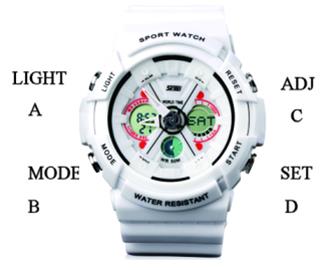
(SKMEI 0966 Digital Watch Dial Plate)
A. Features
- In normal mode: Display hours, minutes and seconds, week.
- 29 Time Zone and Daylight-saving Time function
- 4 set the Alarm function, 1 Snooze function, Chime function.
- 60 minutes countdown function
- 1/90 Stopwatch function
- LED back light function
B. Operational Manual
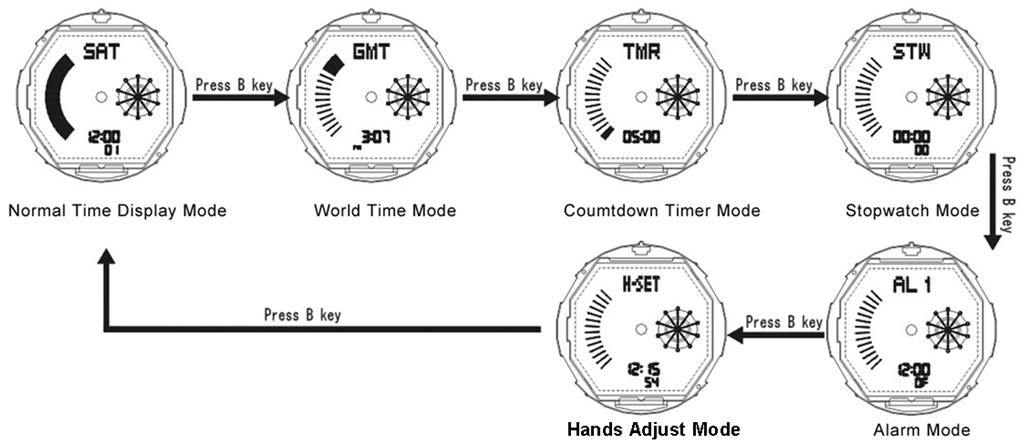
In normal mode, Press A key for LED light ON. Press D key to display Month and Date. Press B key to convert the MODE as following:

In Normal Time Model Hold C key for 2 seconds to enter into time setting mode, "seconds" flashing, press the B key to choose the object as following:
- Press D key, plus 1 for the object, if hold D key will increase rapidly.
- Press A key, reduce 1 for the object, hold A key will reduce rapidly.
- When set the object of "Time Zone", press D key to upward the Time Zone, press A downward Time Zone.
- When set the object of "Daylight-saving Time", press D key to OFF/ON, if display "DST" means ON, otherwise means OFF.
- When set 12/24H format, press the D key to convert it.
- When set the object of "seconds", if the seconds within 0 ~ 29 seconds, press the D key the seconds will back to 00; if within 30~59 seconds, press D key back to 00, at the same time the minutes will plus 1 minutes.
- When set "year", "month", "day", press A/D key to adjust, and the week will adjust automatically according to date.
- When set the “LED” lighting time, the icon of " ✲ " flashing, press D convert to "❈", If the icon been settled to "✲", the LED light ON for 1 seconds, if the icon been settled to "❈", the LED light ON for 2 seconds.
1) World Time Mode
In Word Time Mode:
- Press "C" key for 2 seconds to ON/OFF the Daylight-saving Time, if ON will show icon of "DST", otherwise will disappear.
- Press D key to choose time zone, hold D key to choose time zone quickly.
2) Countdown Mode
- The max countdown range is 60 minutes; the default countdown range is 5 minutes.
- Press D key to start/pause the countdown.
- When the countdown is processing, press D key to pause, then C key to return to the original set value.
3) Countdown time Setting
- In countdown mode, press the C key for 2 seconds the Hour flashing, enter into countdown time setting state. Press the B key to choose the object: Hours → Minutes → Seconds.
- Press D key, plus 1 for the object, if hold D key will increase rapidly.
- Press A key, reduce 1 for the object, hold A key will reduce rapidly.
- Press B key enter into circulation countdown setting state, press D key to convert. " → " means when the countdown over, will automatically back to original set value. " 🔁 " means when countdown over will automatically circulation countdown. " ♪ON/ ♪OFF " means ON/OFF warning tone. If ON, when the countdown less than 30 minutes, the warning tone will prompt.
- Press C key to exit
4)Stopwatch Mode
- In stopwatch mode, press D key once to start, press D key again to suspend. When suspend, press C key back to 0:00:00.
- In stopwatch mode, press D key to start, press C key enter into split function. press C key again to get the record and the stopwatch still processing in the background. Press D key to suspend. press C key back to 0:00:00
5)Alarm Mode
In alarm mode, press D key to choose "SIG (Hourly chime)," "AL1 ~ AL4" (four sets alarm) and "SNZ" (snooze function):
- Press C key to ON/OFF Alarm function, if the icon "ALM" show means ON, otherwise means OFF
- Hold C key for 2 seconds the "Hours" flashing, press B key to choose " ←→" hours minutes.
- Press D key, plus 1 for the object, if hold D key will increase rapidly.
- Press A key, reduce 1 for the object, hold A key will reduce rapidly.
- In AL1 ~ AL4, if the time is alarm time, the alarm will chime for 20s, press any to stop chime.
- In SNZ (snooze function) if the time is alarm time, the alarm will chime for 20s, then every 5 minutes will chime 20s, till the alarm chime 7 times then stop.
- If SIG (Hourly chime) ON, then icon of "🕐" will display and the alarm will chime every hour. otherwise have not this icon.
- Press C key to exit.
6)Adjust the hands
- In Hands adjust mode, hold C key until the time flashing enter into Hands setting mode, hold D to adjust the hands time.
- press C key to exit
Remark: after replacing the battery, LCD will display12:00: 00 and flashing, means automatically enter into the hands adjust mode.
* See also 6 digit operation manual
