◆SKMEI 1180 Watch Instruction

(SKMEI 1180 Pedometer Watch Dial)
A. FEATURE
- Normal Time: Hour, Minutes, Second, Day and Weekday;12/24 hr. format.
- Calendar (Yr. 2000-2099)
- 2-set alarm: Dailly alarm & hourly chime
- 1/100 Second Chronograph ranging from 0 to 59:59:99,with SPL function.
- Countdown function, up to 23hr.59min.
- Dual time, adjust the time difference: -12~+12 hour.
- Pedometer mode.
- Smart step for 7 seconds
- Three types of pedometers: Total steps / time display mode→ Total steps / exercise time display mode→ calories / mileage display mode; User Information settings: metric / imperial→ weight→ G-Sensor sensitivity.in59sec,
- Notice: most accurate pedometer range,80 – 130 steps/ minute
- 30-day automatic memory storage step function.
- Heart rate mode: Touch-on pulse measuring, showing dynamic heart rate 30-200 indicate whether the charging animation.
- Whether the heart rate measurement mode
- 3 seconds EL backlight
B. FEATURE SELECTION
- [MODE]: Change Function: Time Mode, Step Memory Mode; Press and hold 2 seconds to enter setting mode. Changing the setting times.
- [DOWN]: Press reduce 1, press and hold for quickly adjust; Press and quickly on/off alarm; Press to turn on/pause stopwatch, countdown function; Press to downward check the history record. Under Time mode/ Pedometer mode press to the heart rate mode.
- [UP]: Press plus 1, press and hold for quickly adjust; Under Time mode, press to change the following mode: AL1 → AL2 → Stopwatch → Countdown → Dual time.
- Total steps/ time/ target steps → mileage/ time/ calories → speed per hour/ time/ exercise time; Press and hold to lock/ unlock.
- [ EL]: Press to on EL light for 3 seconds; Press to no/off SPL function; Under pause the countdown, press to the default value.
C. FUNCTIONAL
1. TIME/DATE SETTING

- Press【 UP 】to switch the following mode: AL1 → AL2 → STOPWATCH → COUTDOWN → DUAL TIME, as shown:

- Press and hold 【MODE】2 seconds enter the time setting, 12/24-hour digit flashes.
- Press [MODE] to switch setting items: 12/24hour format → hour → minute → second → year → month → day0 → exit, as shown:
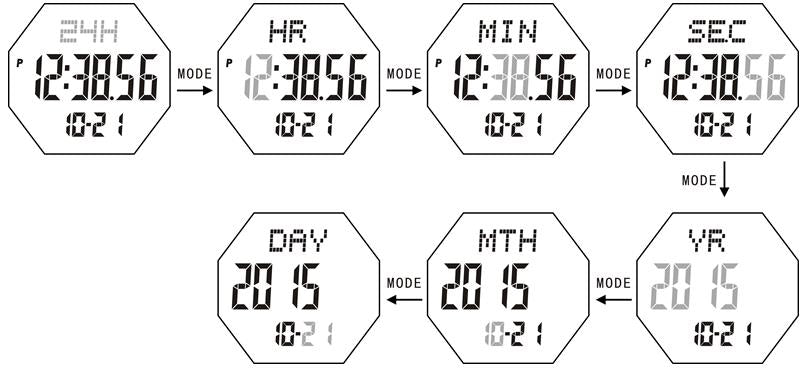
- Press [DOWN] or [UP] key downward / upward adjust the setting items; press and hold【DOWN】or【UP】2 seconds to rapid adjust. Adjust year, month, day, weekday will be updated automatically under the time setting mode, no button operation for 30s.
2. ALARM
- Under time mode, press【 UP 】to alarm mode.
- Press [DOWN] to on /off alarm quickly; the alarm icon displays in all modes return on alarm.
- Press and hold【MODE】2 seconds enter alarm setting, press [MODE] to switch the setting items: hour → minute → hourly chime on /off, as shown:

- Press [UP] or [DOWN] downward/ upward adjust the setting items, press and hold Press【UP】or【DOWN】2seconds to rapid adjust. Alarm time is reached, the alarm icon flashes, 1 minute “BiBi” alarm reminder, press any key to stop the alarm.
- 30 seconds without any key operation, auto-exit alarm setting mode, return to the time display mode.
- In the alarm display mode, no button operating, does not automatically return to time display mode.
Note: enter the alarm setting mode, the alarm turns on automatically and display the alarm icon.
3. STOPWATCH

- Press[UP] to switch stopwatch mode, the inittial value:00’00”00;
- Press[DOWN] to start/ stopstopwatch, press[EL] to zero when stop the time.
- During the stopwatch timer, press [EL] to turn on the SPL function, “SPL” will flash on the screen, stopwatch running, Press [EL] again to return to the stopwatch timer.
- Stopwatch reaching the maximum (59’59”99), the non-alarm prompted to restart the stopwatch timer.
- Stop the stopwatch, no operation will not automatically return to time display mode.
NOTE: under turn on the SPL function, switch to other functions mode, automatically canceled SPL function, stopwatch to run continually.
4. COUNTDOWN TIMER

- Press [UP] to switch to the countdown mode, the initial value:00:00.00.
- Press and hold [MODE] 2 seconds to set the countdown timer, press [MODE] to switch setting items: hour → minute,
- As shown:

- Press [UP] or [DOWN] downward/ upward adjust the setting value, press and hold [UP] or [DOWN] 2 seconds to rapid adjust.
- In the case of the countdown to 0 and cannot start the countdown; countdown time, non-0, press [DOWN] key to start/stop the countdown.
- Under pause the countdown, press [EL] to return to countdown settings.
- Start countdown, the countdown icon will be blinking in all modes. stop the countdown, the countdown icon disappears.
- When countdown reach to 00:00.00, the countdown icon disappears and 1 minute “Didi” alarm reminders, press any key to stop the alarm.
- When stop the alarm, display the countdown setting value.
- When the alarm time and the countdown reach the same time, the only rings countdown tips.
- In the setting countdown, no button operation for 30 seconds, automatically exit setting and return the countdown mode.
- In the countdown mode, no button operation, does not automatically return to time display mode.
NOTE: Enter the countdown setting, the countdown to zero automatically.
5. DUAL TIME
- Press [UP] to switch the dual time mode, adjust the time difference:-12~+12 hour, the inittial value:0 time difference.
- Press and hold [MODE] 2 seconds enter the time difference setting, as show:

- Press [UP] or [DOWN] downward/ upward adjust the setting items, press and hold Press [UP] or [DOWN] 2seconds to rapid adjust.
6. PEDOMETER MODE
- Press [MODE] to switch the pedometer mode, step number is displayed as 0.
- Press [UP] to switch the display: Total steps/ time/ target steps → mileage/ time/ calories → speed per hour/ time/ exercise time, as shown:

- Total steps/ time/ target steps: the time display the down LCD screen, the total steps display the middle LCD screen, the target steps the up LCD screen, Max step number :999999 Steps.
- Mileage/ time/ calories: the time display the down LCD screen, the calories display the middle LCD screen, the mileage display up LCD screen, maximum:999999 kcal and 999KM.
- Speed per hour/ time/ exercise time: the time display the down LCE screen, the exercise time display the middle LCD screen, the speed per hour display the up LCD screen, maximum: 99.9KM and 999999MIN( minuts).
- In the step/ time mode or steps / exercise time mode, press and hold [MODE] key for 2 seconds to enter setup or check with the user information state,default: Metic setting item flashes.
- Under the user information setting state, press [MODE] key to switch setting items: metric / imperil → height→ step distance → target steps → G-Sensor sensitivity, as shown:
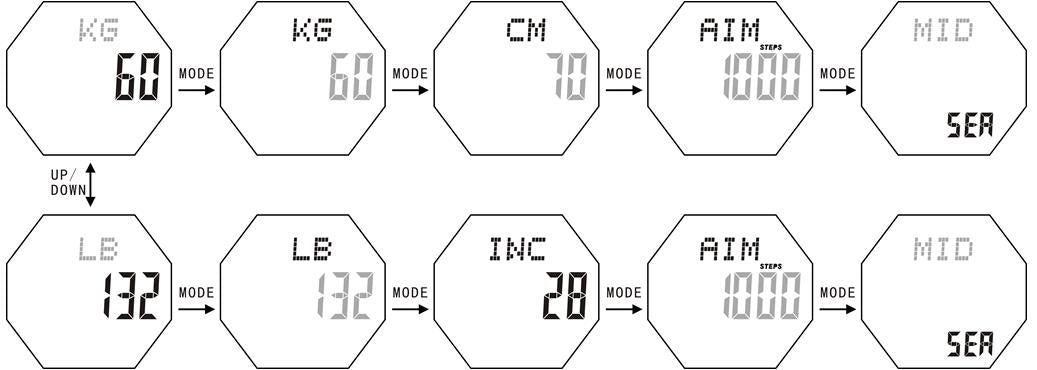
- Metric or imperial: The default to metric, press [UP] or [DOWN] key to switch the switch the selected metric / imperial.
- Adjustment of metric/ imperial; system setting items, the weight and step distance restore the default value automatically;
- Setting weight: the default vaueis 60KG(132LB), adjustable range:30-200KG / 66-440LB;
- Setting step distance: defaulf step distance is 70CM(28INCH), adjustable range:30-150CM/12-59INCH ;
- Press [UP] or [DOWN] key up ward / downward adjust the setting items, press and hold [UP] or [DOWN] key for 2seconds to rapid adjust;
- G-Sensor Sensitivity: default value: MIDDLE, the sensitivity level for choice: LOW → MIDDLE → HI.
- In the step / time mode, press [EL] 2 seconds, flashing display “CLR”, you are prompted to zero; press [EL] key to the steps number, calories, distance value is zero automatically, as shown:

- In the pedometer mode, 30 minutes without any key operation, auto-return time display mode.
- In the user information setting mode, on button operation for 30 seconds, automatically exit the setting mode.
- In the steps to zero mode, 4 seconds without any keys operation or press any keys (except the EL key), automatic exit the steps to zero mode, return to step display mode.
NOTE: In the three types of step mode, all can count steps.
7. STEP MEMORY STORAGE MODE

- press [MODE] key to switch to the step memory storage mode, the default value: 00.
- The date of the historical record display on the up-LCD screen, the steps, calories and distance of the historical record on the down LCD screen with 2 second for the cycle of automatic switching display (calories do not show decimal places, the mileage display 2 decimal places), as shown:

- Press【UP】or【DOWN】key upward / downward to view the historical reconds.
- Press and hold 【EL】 button for 2 seconds, the “CLR” flashing display, you are prompted to clear all the recorded data; press [ EL] key, auto clear record of historical exercise, as shown:

- In the state of the memory is cleared, no button operation for 4 seconds or press any key (except the EL key), automatic exit Clear History exercise record status, return to step memory stored mode.
- 30 seconds without key operation, auto exit the step memory storage mode, return to the time display mode.
8. HEART RATE MODE

- At any pattern both fingers have to cover the metal sensor to enter heart rate mode, display “PUL” the words and heart-shaped logo.
- Heartbeat signal is detected, the heart-shaped signs began to beat, heart rate value will display then.

- Under heart rate mode, if no heart rate is detected for 10 seconds, automatic returns to normal time mode.
ATTENTION:
- Both fingers have to cover the metal sensor an mush as possible(The backcase need to touch with your hand). Exert pressure evenly.
- Under cold or dry weather, rub fingers before measuring pulse.
REMARKS:
- This device is not meant for medical purpose. Kindly consult your doctor if needed.
- Avoid using this device in strong static, sonic or electric affected environments.
9. MODE PROTECTION
- In watch mode or pedometer mode, press [UP] key for 2 seconds to lock [MODE] button to switch to other modes.
- To prevent false triggering in the watch to the pedometer mode, resulting in power.
- To prevent the user exit from the pedometer mode, which leads to pedometer failed.