◆SKMEI 1246 Watch Instruction

(SKMEI 1246 digital watch dial)
A. Features
- 13 Digits LCD Display,Display Hour ,Minute ,Second , Year(2000 Year ~2099 Year) ,Month , Day and Week .
- 5 group alarm and Chime hourly.
- Timer function.
- Snooze function.
- 12 / 24H format selectable,Auto Calendar
- 1/100 second Chronograph
- Dual Time
- EL backlight
B. Operational Manual
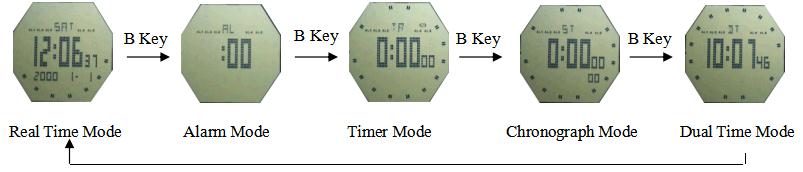
1.In except mount Mode, press B key to select work mode; At any state ,press A key EL backlight for 3 Second.
2.Time Setting
Time Setting:In the timekeeping Mode, Press and hold C key for 2Second to time setting state and "Second" flashing, press D key to zero; Press B key to select item as following sequence :
Hour → Minute → Year → Month → Day
- Press D key to adjust the flashing item;
- Press C key to return to Real Time Mode.
- Press D key while the seconds are in the range of 30 to 59 resets them to 00 and adds 1 to the minutes .In the range of 00 to 59 resets them to 00 and adds to the minutes. In the range of 00 to 29,the minutes are unchanged.
- 12/24-Hour format
- In the timekeeping Mode, Use D to toggle between 12-hour (12H) and 24-hour (24H) timekeeping.
3.Alarm Function
- You can set up to five independent alarms with hour, minutes, month, and day. When the alarm is turned on, When the actual alarm time is reached, an alarm tone sounds for 10 seconds. You can also turn on an hourly time signal that causes the watch to beep twice every hour on the hour.
- The alarm number (AL1 though AL5) indicates an alarm screen. In the alarm Mode, Press C to turn it ON /OFF the alarm on indicator.
- In the alarm AL1 Mode, press C to select the snooze alarm (SNZ), Press C key to turn on/off Snooze function and the alarm on indicator; At Alarm AL1 sounding state , When Snooze function be ON ,it will sound five minutes later ,and auto stop after sounding for a minute .
- Press C key to turn off Snooze function.
- Alarm Types: The alarm type is determined by the settings you make, as described below .
- Daily alarm : Set the hour and minutes for the alarm time .This type of setting causes the alarm to sound everyday at the time you set .
- Daily alarm : Set the month, day, hour and minutes for the alarm time .This type of setting causes the alarm to sound at the specific time, on the specific date you set .
- 1-Month alarm : Set the month , hour and minutes for the alarm time .This type of setting causes the alarm to sound everyday at time you set, on the day you set .
- Month alarm : Set the day, hour and minutes for the alarm time . This type of setting causes the alarm to sound every month at time you set, on the day you set .
- To set an alarm time:
- a). In the alarm mode, press D to select the alarm whose time you want to set.
- b). After you select an alarm, hold down Until the hour digits of the alarm time start to flash, which indicates the setting screen.
- c). press B to move the flashing in the sequence shown below to select other settings.

- d). While a setting is flashing, use D to change it. To set an alarm that does not include a month (Daily alarm, Monthly alarm), set -- for the month. Press D until the – mark appears (between 12 and 1) while month setting is flashing. To set an alarm that does not include a day (Daily alarm, 1-Month alarm), set -- for the day. Press D until the – mark appears (between 31 and 1) while the day setting is flashing. Press C key to return to alarm Mode.
- 5 group alarm setting is same as above.
- Turn On / Off Snooze and Chime:
- a). In the alarm (AL1)Mode, Press C key to turn on/off Snooze.
- b). In the“AL :00” Mode,Press C key to turn on/off Chime ( CHI ).
SNZ :Indicates Snooze function is on.
CHI :Indicates Hourly Time Signal is on. - c). If any alarm is on, the alarm on indicator is shown on the display when you change to another mode.
4.Timer Function
- The countdown timer can be set within a range of one minute to 24 hours. An alarm sounds when the countdown reaches zero, the countdown end beeper sounds for about 10 seconds, or until you press any button to stop it.
- Configuring the countdown timer:
- a). In the countdown Mode, hold down C until the hour digit of the countdown time starts to flash, which indicates the setting screen. Press A key to toggle auto-repeat on (
 displayed ) and off ( not displayed ).
 - b). press B to move the flashing in the sequence shown below to select other settings.

- c). While a setting is flashing, use D to change it.
- d). Press C key to return to countdown Mode.
- e). To set the starting value of the countdown time to 24 hour, set 0:00 00.
- Timer operation
Press D key to Start/Stop counting ; Press C key to starting value when stop counting.
5.Chronograph
- The display range of the Chronograph is 23 hours ,59 minutes ,59.99 seconds.
- The stopwatch continues to run, restarting from zero after it reaches its limit, until you stop it.
- The stopwatch measurement operation continues even if you exit the Stopwatch Mode.
- Exiting the Stopwatch Mode while a split time is frozen on the display clears the split time and returns to elapsed time measurement.
To measure times with the stopwatch

6.Dual time
- Press C key for 2 seconds to enter into the Dual time setting mode," Hour " flashing when loading , Press B key to select item as following sequence : Hour → Minute
- Press D key to adjust the flashing item;
- Press C key to return to Dual time Mode.
