◆SKMEI 1385 Watch Instruction

(SKMEI 1385 Bluetooth watch button)
- Key S1: Up,Begin timing ,Pause,Switch,Photograph
- Key S2: Selection,Setting,Reset
- Key S3: Mode Conversion,Confirming and Save
- Key S4: EL Back Light, Bluetooth Switch
A. Features
- 8-digits timer function,the normal time mode display Week,Hours,Minutes,Seconds,under the normal time mode display,press Key S3 to see months,date (Synchronize automatically with your phone when connected with the phone)
- 12/24 hour format setting selection (Synchronize automatically with your phone when connected with the phone)
- 24 hours precise 3D pedometer/calorie consumption/distance detection (The date can be uploaded to the phone when connected with the phone)
- Alarm:Timing Alarm (The alarm time can be set by the APP when connected with phone.)
- Stopwatch/Chronograph: Maximum stopwatch timing 23 hours, 59 minutes and 59 seconds, can be split
- EL backlight, press Key S4 one time the light will last 2 seconds.
- Low Battery Power Reminding (the icon flashes when voltage of the battery is under 2.4V)
- The Bluetooth function can be turned on and off (different application mode to save power)
- Synchronize the time, date and alarm setting smartly in your phone, instead of the cumbersome manual operations.
- Reminding of Calls, SMS, QQ, WeChat, Twitter, Facebook,WhatsApp and Skype.
- Taking Photo from Phone Camera by remote control
- Turn on the mobile phone network before connecting the bluetooth
B. Operational Manual
ON/OFF Mode

Bluetooth ON/OFF Mode

Date Setting Mode

Remarks
1.Calender range: 2000-2099
2.In any setting mode,it will return to the normal time display(Bluetooth off) automatically if without any operation more than 10s
3.In any setting mode,press Key S3 to confirm the current setting and return to the previous menus
Low Battery Reminding Function
When the battery voltage is lower than 2.4V, low battery icon will flash to remind the user to change the battery
Alarm Setting Mode
Alarm Setting Mode(Bluetooth Off):

Remarks
1.When reach to preset alarm time, it will beep for 7s.
Chronograph Setting Mode

Remarks
1.The maximum chronograph time is 23:59’’59.99’,the first 23’’59.99' accurate to milliseconds, then accurate to second.
2.If the record runs up to the maximum, the stopwatch will start recording from zero again.
3.If the stop watch is running and hasn’t been reset, while switch to other function mode, the stopwatch will run continually in backstage.
Switch Mode

EL Back Light
At any mode, press Key S4 once, the EL back light on for 2 seconds.
Time and 12/24H Setting
Time and 12/24H Setting(Bluetooth Off):

Remarks
1.In any setting mode of time and 12/24H, press Key S3 to save the current setting and return to normal time display (Bluetooth off)
2.In any setting mode, it will return to the normal time display automatically if without any operation more than 10s.
How to check the current day sport data
Checking the current date sport data in the Bluetooth off status:

REMARKS
Current Date Means every day 0:00 am-23:59pm
The 24H pedometer function ON by default when the watch boot and the first 10 steps generally can not be detection,which will be allowed for deviation, not record in the pedometer device.
How to download the APP and install in the phone
-
IOS phone APP download and install
PHONE/IPAD scan QR CODE of following P1 or search keyword “Watch M” on APP Store , then download & install the APP, Click the Watch M icon to open the APP. -
Android phone APP download and install
1) Android mobile phone(Foreign Users)scan the QR CODE of following P2 or search keyword “Watch M” on Google PLAY to download and install the APP, click the Watch M icon to open the APP. The phone will remind the user to turn on the bluetooth function If the mobile bluetooth function OFF to allow the Watch M icon to connect the APP.
2)Android mobile phone(China Domestic Users) scan the QR CODE of following P3 or search keyword “Watch M”on Application of treasure to download and install the APP, click the Watch M icon to open the APP. The phone will remind the user to turn on the bluetooth function If the mobile bluetooth function OFF to allow the Watch M to connect the APP.

-
Android mobile phone app download and install:
Click “Allow” to allow install and then click "Install" to carry on installing, click “Done" to finish installing, click “open” to open the app.
After opening the app,you can set personal information,including “Head portrait,Unit,Gender,Age,Weight,Targeted steps,Step length”
(Click the Head portrait on the top to set it,click “Me” on the bottom right to enter “Parameters settings”)
Bluetooth Connection And Binding
Turn on the Bluetooth both on mobile phone and watch before using Bluetooth to connection and binding them. Open the APP then click “set” → “Connect Watch” →searching around watch → select Watch M and connect. If success, it will display “Watch connected” as the following pictures.

Remarks: The android mobile operating system must be or above android version 4.3. The android mobile Bluetooth must be above 4.0 version; The apple mobile phone must be or above IPHONE 4S versions.

Data sharing after Bluetooth Connectivity
Click “sport” icon to enter into the sports data, then click “Share” to share your data to Sina Weibo, QQ Zone, WeChat friend, WeChat Moment, WeChat Favorites, QQ, E-mail, Message

Data synchronization After Bluetooth connect.
1. Time synchronization: Time will be synchronized when connect with Phone successfully.
Click “Clock” Icon to choose the time zone, daylight saving time (DST), then click the Synchronize.
2. Click “Sport” to view the current data of sports: Sport Steps, Mileage, Calories Consumed, Sport time. 
3.Alarm Clock Setting
(Click “Alarm Clock” Icon → Select Alarm → Select Date → Click “Time” → Set time → Click “OK”)
4. Reminding Setting (Need connect to the phone)
1) Call Reminding
2)E-mail Reminding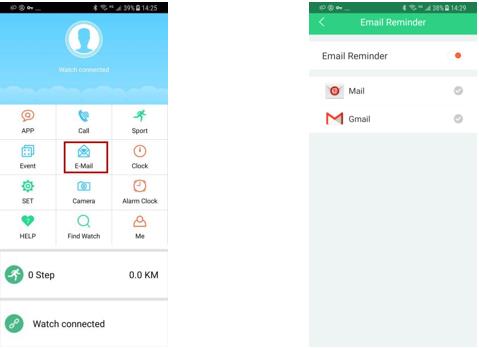
3) APP Messages Reminding: QQ, WeChat, Twitter, Facebook, WhatsApp, Skype, Line, Instagram, Tencent Weibo, Sina Weibo
(Click “APP” to enter into remind setting, open all of the remind, click “Message Reminder” to enter into message setting

Remarks:
1) The watch will make “Beep" voice for 7 seconds after setting up alarm time on APP.
2.) The watch will make “Beep” voice for 12 seconds to remind When open all permissions and turn on the reminding of Call, SMS, E-mail, QQ, WeChat, Twitter, Facebook, WhatsApp, Skype, Line, Instagram, Tencent Weibo, Sina Weibo.
5. Remoting phone camera:
After connecting the watch with phone via Bluetooth.
Turn on camera firstly on the phone, then press S1 key on watches to remote phone camera.
