◆SKMEI 1571 Watch Instruction
Features
- Four modes: time mode,stopwatch mode, alarm mode and dual time mode.
- Normal time shows week, year, month, day, hour, minute, second. (Date range 2000-2099)
- Alarm function, the alarm time is 30 seconds.
- Function of whole time reporting.
- 1/100 second stopwatch function; The maximum of the stopwatch is 23 hours, 59 minutes and 59 seconds.
- Start up time: 12:00 TUE on January 1, 2013; Alarm, the hour, stopwatch.
- The user can choose 12 or 24 hours display in digital display screen.
- Move point move animation.
- Four-key operation.
- Operating voltage 3.0v.
Key description
Four key operations: A(Light),B(Mode),C(Adjust),D(Set)

LCD diagram:

Functional operation description:
Press D key in time mode to switch different display screens

Mode switching:

Remark:
Any display screen in time MODE (pointer display, digital display, date display (8D/10D), week, date and year cycle animation) can be switched by pressing B key. Return to time mode to display the original screen.
Hour switch:
Note:
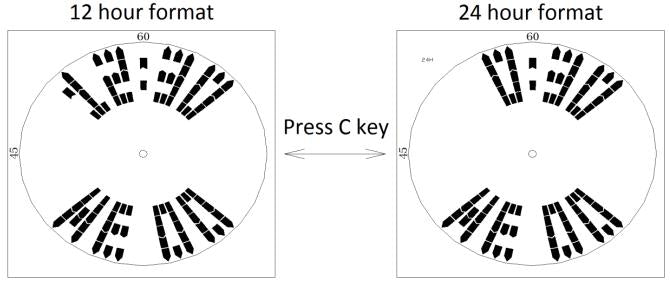
Digital time display screen in time mode can be switched to 12/24 mode by pressing C key (analog pointer screen only shows 12 hours)
Time setting:

Remark:
- In each display screen under time mode, press D key for 2 seconds to enter the setting mode. Exit the Settings mode and return to the original screen
- In the setting mode, the hour clock will not be announced.
- Press C key to increase the value,keep pressing C key to increase value quickly.
Stopwatch mode:

Attention:
For stopwatch mode, it shows ‘minutes:seconds:milliseconds’ for first hour and ‘hours:minutes:seconds’ after that
Time will stops to count when it reaches ‘23:59:59’ and stopping with showing ‘23:59:59’
Alarm & Chime ON/OFF:

Alarm mode:

Dual time mode:

Reset:
Pressing A+B+C+D key for 2 seconds,with full light on screen, functions reset
Remark:
Press C key to increase the value,keep pressing C key to increase value quickly.
Animation Style:
1-2 style animation showing when you change mode
Character showing:

MOD2 Animation showing from Sunday to Saturday

