◆SKMEI 1667 Watch Instruction

(SKMEI 1667 Azan Watch Button)
【A】button:LIGHT/ -
【B】button:SET
【C】button:QIBLA
【D】button:MODE/+
A. Features
- Time display, hour, minute, second, day, month, week, religious month, religious day
- 12/24 hour,Gregorian calendar, HIJRI calendar, city data
- Qibla direction
- Prayer time and name display
- Alarm function
- Stopwatch function
- Language selection function
- Summer time function(DST)
- Volume adjustment function
- Bookmark function
- Backlight
B. Operational Manual
1. Menu Options

(Press D key to switch menu options in time display, press A key to switch back in other menu options screen)
Time display → HIJRI calendar display → next worship time (MAGRIB) →ISHA prayer time →FAJR prayer time →SHUROQ time →DHUHR prayer time →ASR prayer time→MAGRIB prayer time →QIBLA →SET TIME →SET SECONDS →CITY SELECT →LANGUAGE SELECT →GREGORIAN/HIJRI CALENDAR DISPLAY →TIME DISPLAY →AZAN DISPLAY →TAQWEEN →AZAN SAFETY → DST SELECT →ALARM →STOP-W →VOLUME → Bookmark → SHORT CUT →Electricity
Remarks: The sequence of worship time according to the time of next prayer time changing. As shown,if the next worship time is MAGRIB, then the watch display interface is ISHA time → FAJR time → SHUROQ time → DHUHR time → ASR time →MAGRIB time
(1) Time Display

Button function:
- Press【A】key: Turn on the backlight
- Press【B】key: Short press invalid, long press 2s to enter the setting mode
- Press【C】key: Measuring direction
- Press【D】key: Short press to switch the menu options, long press for 2s to switch quickly
Setting mode:
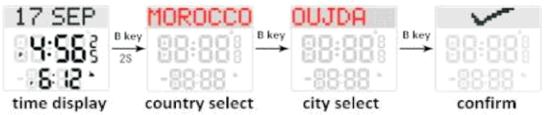
Button function:
- Press [A] key: Short press to select country / city name, long press 2s to select country / city name quickly
- Press [B] key: Switch settings
- Press [C] key: Measuring direction
- Press [D] key: Short press to select country / city name, long press 2s to select country / city name quickly
(2) HIJRI date:
- Press【D】key to enter the calendar interface,then press【B】key for 2s:enter setting mode
Setting mode:
- Press【A】key: Short press the value minus 1. Press and hold 2s value to decrease rapidly
- Press【B】key: Switch settings: Day → Month → Year → Exit (confirm)
- Press【C】key: Measuring direction
- Press【D】key: Short press the value to increase by 1, press and hold 2s to increase the value quickly
(3) MAGRIB、ISHA、FAJR、SHUROQ、 ZUHR、ASR:
- Press【B】key for 2s:enter setting mode
Setting mode:
- Press【A】key: Short press the value minus 1. Press and hold 2s value to decrease quickly
- Press【B】key: Switch settings:Time→Alarm Time→Exit (confirm)
- Press【C】key: Measuring direction
- Press【D】key: Short press the value to increase by 1, press and hold 2s to increase the value quickly
(4) Qibla direction:
- Press【D】key until to QIBLA interface,then press【B】key for 2s: enter reference view status
Setting mode:
- Press【A】key: Adjust direction
- Press【B】key: Exit (confirm)
- Press【C】key: Measuring direction
- Press【D】key: Adjust direction

Compass calibration method:
- Step 1: Enter the QIBLA mode and press B key 2s to enter the reference view state, then press D key to switch to the CALIBRATION COMPASS interface.
- Step 2: Press and hold the B key to enter the compass calibration, displays ROTATE.
- Step 3: Keep the watch level and rotate clockwise or anticlockwise at a constant speed. The ROTATE characters on the display interface are slowly covered.
- Step 4: Until the ROTATE characters on the display interface are completely covered, the automatic exit setting indicates that the calibration is completed.
(5) TIME SET:
- Press【D】key until to SET TIME interface, then press【B】key for 2s: enter setting mode

- Press【A】key: Short press to decrease value by 1, long press 2s to decrease value rapidly
- Press【B】key: Switch setting item
- Press【C】key: Measuring direction
- Press【D】key: Short press to increase the value by 1, long press 2s to increase value rapidly
Remarks:
- Year setting range: 2000 ~ 2099
- Switch to the last item and press B key to exit the setting mode. "√" is displayed when exiting
(6) SET SECONDS:
- Press [D] key until to SET SECONDS interface, then press [B] key for 2s: enter setting mode
Setting mode:
- Press【A】key: Short press to decrease value by 1, long press 2s to decrease value rapidly
- Press【B】key: Exit(confirm)
- Press【C】key: Measuring direction
- Press【D】key: Short press to increase the value by 1, long press 2s to increase value rapidly
(7) CITY SELECT:
- Press【D】key until to CITY SELECT interface, then press【B】key for 2s: enter setting mode
Setting mode:
- Press【A】key: Switch countries/cities (English country names are sorted by initials A-Z in reverse
- sequence)
- Press【B】key: Switch setting items: Country → City → Exit (confirm)
- Press【C】key: Measuring direction
- Press【D】key: Switch Countries/ cities (English country names are sorted by initials A-Z in proper order)
(8) LANGUAGE SELECT:
- Press【D】key until to LANGUAGE SELECT interface, then press【B】key for 2s: enter setting mode
Setting mode:
- Press【A】key: Switch English/Arabic
Press【B】key: Exit (confirm)
Press【C】key: Measuring direction
Press【D】key: Switch English/Arabic
(9) Gregorian / HURI selection:
- Press【D】key until to CALENDAR DISPLAY interface, then press【B】key for 2s: enter the setting mode
Setting mode:
- Press【A】key: Gregorian / HIJRI calendar switch
- Press【B】key: Exit (confirm)
- Press【C】key: Measuring direction
- Press【D】key: Gregorian / HIJRI calendar switch
(10) Time display:
- Press【D】key until to TIME DISPLAY interface,then press【B】key for 2s: enter the setting mode
Setting mode:
- Press【A】key: 24H (hour,minute,second) → 24H (hour,minute)→ 12H (hour,minute,second) → 12H (hour,minute)
- Press【B】key: Exit (confirm)
- Press【C】key: Measuring direction
- Press【D】key:24H(hour,minute,second) → 12H(hour,minute) → 12H(hour,minute,second) → 24H(hour,minute)
(11) Prayer time display:
- Press【D】key until to AZAN DISPLAY interface,then press【B】key for 2s: enter the setting mode
Setting mode:
- Press【A】key: Cycle switch ALTERNATE → MINUTES AFTER → AZNA TIME
- Press【B】key: Exit (confirm)
- Press【C】key: Measuring direction
- Press【D】key: Cycle switch ALTERNATE → AZNA TIME → MINUTES AFTER
(12) Prayer time calculation:
- Press【D】key until to TAQWEEN interface,then press【B】key for 2s: enter the setting mode
Setting mode:
- Press【A】key: HANAFI → ISNA → MSLM LG → UMALQURA → FIXED → EGYPT
- Press【B】key: Exit (confirm)
- Press【C】key: Measuring direction
- Press【D】key: EGYPT → FIXED → UMALQURA → MSLM LG → ISNA → HANAFI
(13) Safe worship time:
- Press【D】key until to AZAN SAFETY interface,then press【B】key for 2s: enter the setting mode
Setting mode:
- Press【A】key: Short press to decrease the value by 1, press 2s to decrease the value quickly
- Press【B】key: FAJR→SHUROQ→ZUHR→ASR→MAGRIB→ISHA→confirm settings and exit
- Press【C】key: Measuring direction
- Press【D】key: Short press to increase the value by 1, press 2s to increase the value quickly
Noted:
- Setting range: -30~30
- When the safe worship time value is set, the value will be added when the prayer time arrives (for example: Set the safe worship time value is -2,prayer time is 12:22,prayer time plus -2 is 12:20,when the time reached 12:20, it started to alarm.)
(14) DST (summer time):
- Press【D】key until to DST SELECT interface,then press【B】key for 2s: enter the setting status
Setting mode:
- Press【A】key: OFF/ON Switch
- Press【B】key: Exit (confirm)
- Press【C】key: Measuring direction
- Press【D】key: OFF/ON Switch
(15) ALARM mode:
- Press【D】key until to ALARM interface, then press【B】key for 2s: enter setting mode
setting mode:
- Press【A】key: Short press to decrease the value by 1, press 2s to decrease the value quickly
- Press【B】key: Hour → Minute → Alarm → Exit (confirm)
- Press【C】key: Measuring direction
- Press【D】key: Short press to increase the value by 1, press 2s to increase the value quickly
(16) STOP-W mode:
- Press【D】key until to STOP-W interface, then press【B】key for 2s: enter setting mode
setting mode:
- Press【A】key: Reset
- Press【B】key: Exit (confirm)
- Press【C】key: Measuring direction
- Press【D】key: ON/OFF stopwatch
(17) VOLUME:
- Press【D】key until to VOLUME interface, then press【B】key for 2s: enter setting mode
setting mode:
- Press【A】key: 1→OFF
- Press【B】key: Exit (confirm)
- Press【C】key: Measuring direction
- Press【D】key: OFF→1
(18) Bookmark:
- Press【D】key until to Bookmark interface, then press【B】key for 2s: enter view status
setting mode:
- Press【A】key: Short press to decrease the value by 1, press 2s to decrease the value quickly
- Press【B】key: Exit (confirm)
- Press【C】key: Measuring direction
- Press【D】key: Short press to increase the value by 1, press 2s to increase the value quickly
(19) SHORT CUT:
- Press【D】key until to SHORT CUT interface, then press【B】key for 2s: enter setting mode
setting mode:
- Press【A】key: TO AZAN → QURAN BOOKMARK → QIBLA → ALARM → STOP-WT
- Press【B】key: Exit (confirm)
- Press【C】key: Measuring direction
- Press【D】key: ALARM → QIBLA → QURAN BOOKMARK → TO AZAN → STOP-WT
(20) Electricity display:
- Press【D】key until to electricity interface,then press【B】key for 2s to display remaining electricity
- In the remaining electricity display interface, then press【B】key will return to the electricity display interface
Synthesis:
- In setting mode, setting item flashing display.
- Set the time and frequency of the alarm, the volume must be turned on, or there's no alarm.
