◆SKMEI 1759 Watch Instruction
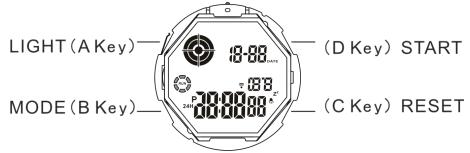
(SKMEI 1759 10ATM Digital Watch Button)
A. Features
- 12 Digits LCD Display, Display Hour ,Minute ,Second ,Month , year (2000 ~ 2099), Day and Week
- Daily Alarm Chime hourly and Snooze Function
- 12 / 24H format selectable, Auto Calendar
- 1/100 second Chronograph with split functions
- Dual Time
- Count down timer with preset value up to 24 Hour.
- EL backlight
B. Operational Manual

1. At any state ,press A key LED backlight for 2s.
Real Time Mode
- Time Setting
- Press and hold C key for 2s to time setting state and "Second" flashing, press D key to zero; Press B key to select item as following sequence :

- Press D key to adjust the flashing item,
- Press C key to return to Real Time Mode.
- Press D key while the seconds are in the range of 30 to 59 resets them to 00 and adds 1 to the minutes .In the range of 00 to 59 resets them to 00 and adds to the minutes. In the range of 00 to 29,the minutes are unchanged.
- 12/24-Hour format :In the timekeeping Mode, Use D to toggle between 12-hour (12H) and 24-hour (24H) timekeeping.
Alarm Mode
- Turn On / Off Alarm and Chime
- Press C key to turn on/off Alarm and Snooze (

 )
) - In Alarm Mode, press button D, then C to turn on/off ( ) hourly chime
- Alarm setting
Press and hold C key for 2s to select "Hour" setting ; Press B key to select "Minute" setting; Press D key to adjust the flashing item. - When Alarm is ON, the alarm symbol() will flash once it reach the setting time. After 10 seconds,it will stop automatically.
- Snooze function:The alarm tone sounds at the preset time for 10 seconds, regardless of the mode the watch is in. In the case of the snooze alarm, the alarm operation is performed a total of seven times, every five minutes, until you turn the alarm off. The snooze alarm indicator (“” “” ) flashing.
Chronograph Mode
- The display range of the stopwatch is 23 hours, 59 minutes, 59.99 seconds.
- The stopwatch continues to run, restarting from zero after it reaches its limit, until you stop it.
- The stopwatch measurement operation continues even if you exit the Stopwatch Mode.
- Exiting the Stopwatch Mode while a split time is frozen on the display clears the split time and returns to elapsed time measurement.
- To measure times with the stopwatch:
Elapsed time

Dual Time Mode
- In the Dual Time Mode, press and hold C key until the hour setting starts to flash, which indicates the setting screen.
- Press B key to change the selection in the following sequence.
- Press D key to increase the setting.
- Press C key to exit the setting screen.
Countdown Mode
- In the Countdown Mode, press and hold D key until the hour setting of the countdown start time stars to flash, which indicates the setting screen.
- Press D key to Start/Stop countdown
- When stop the countdown,press C key back to the first setting time
- Timer alarm sounds for about 10s when counting down to 0:00:00.The timer is automatically reset to its starting value after the alarm stops.
- Press C key 2s enter into countdown time setting
- Press B key to adjust “Hour” and then “Minute”
Hour → Minute - Press D key to adjust the flashing item
- Press C key to confirm
