◆SKMEI 1721 Watch Instruction

(SKMEI 1721 Digital Watch Button)
A. Features
- 10 Digits LCD Display, Display Hour, Minute , Second , Month, Day, Year and Week
- Daily Alarm and Chime hourly
- 12 / 24H format select able
- Stopwatch time functions
- Colorful EL backlight
B. Operational Manual
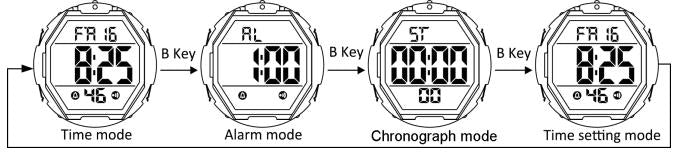
- In the non-setting state, press B key to select the operation mode.
- At any state , press C key colorful LED backlight for 2s.
2.Time mode
- In normal time mode,Press D key to change the 12/24 h format selectable.
3.Daily Alarm Mode
- When setting the alarm clock, in the Alarm Mode,press and hold A key to select " Hour " setting,, Press D key to adjust, then press A key to select "minute"setting and press D key to adjust.
- In the Alarm Mode, press D key to turn on and off the alarm clock sign“
 ”and the Chime hourly sign“
 ”
” - When the alarm clock is turned on, when the alarm clock is set, the alarm clock will ring for 20 seconds and then stop automatically.
- When the Chime hourly keeping is turned on, the alarm clock will sound when it reaches the hourly time .
4.Chronograph Mode
- The display range of stopwatch is 23 hours 59 minutes 59.99 seconds.
- The stopwatch starts to time in 0.01 seconds, and after 30 minutes, it will time in seconds.
- When running ,Press D key to Start running.,Then Press D key to Stop running ; When stop, press A key to zero.
- In stopwatch mode, press D key to start timing,press A Key to split Counting,press D Key to exit split Counting,enter stopwatch stop.Exiting the split Counting,press A Key to display all stopwatch time,press A Key to stopwatch to zero.When running,press B Key to return to the time display mode,stopwatch run behind it.
- Press A key to enter split Counting and then press D key to exit split Counting and enter stop counting.
- When exiting the split Counting, press A key to display all stopwatch time, and then press A key to stop running to zero; When running, press B key to return to the time display mode, and the stopwatch runs behind it.
5.Time setting mode
- In time setting mode, "Second" flashing, press D key to adjust "second" to zero,
- press A key to "hour" flashing, then press A key to enter the adjustment of "minute", "month" ,"day" and "week" in turn.
- press D key to adjust while the seconds are in the range of 00 to 59 resets them to 00 the Minutes value remains unchanged.